Documentation
The videos and the brochure
Depending on the time you have: 10 seconds, 30 seconds, or the full tour. And ten pages to download.
10 seconds
Only 10 seconds? Watch this one.
30 seconds
DMX lighting, sound, video and backstage screens in a single timeline. Free, with no feature or time limit: from 3D preparation to show night.
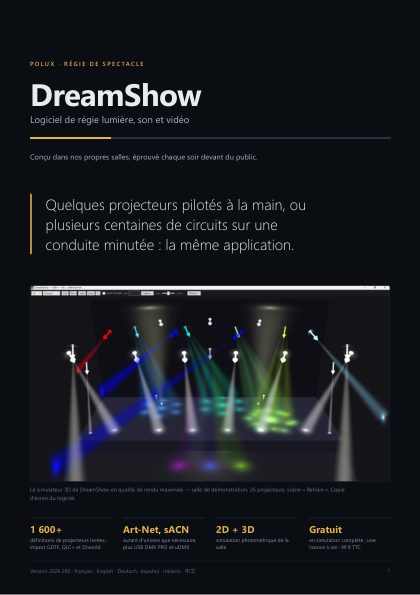
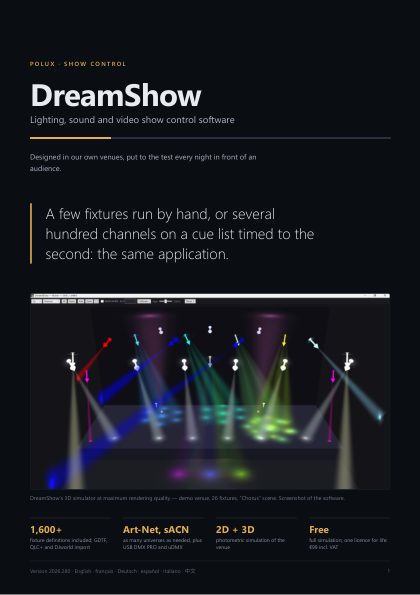
Every scene has its timeline. Lighting, sound, video, backstage screens and waits are set to the same second, and the simulation follows the red line.
No more follow spot and no operator perched up high: a tablet shows the venue plan in its browser, you follow the performer with your finger, and the chosen moving heads all aim at the point you touch.
Try it: the stage is dark. Keep the performer in the light with your mouse or finger.
Each GO moves to the next scene with a crossfade, as in DreamShow. With the sound on at the top of the page, the beams pulse to the music.
The timeline's “Robot” blocks make a Booster K1 get up, talk, dance or wave; “Mask” blocks drive Bluetooth LED masks. A robot only moves when the operator has armed it.
Video: our Booster K1 test robot, with its LED mask.Beams, zooms, colours and the show's video on the virtual venue's screens.
Others import as GDTF or QLC+, or are created in the built-in editor.
The exported show replays on an ESP32, a Raspberry Pi or a Windows PC, at a set time or at sunset.
Give ChatGPT, Gemini, Claude or Le Chat your script or cue sheet (Word, PDF…) with the brief prepared by DreamShow: the venue, the fixtures, your sound files, your robots and masks. The AI writes the show — light, sounds, actions — and DreamShow checks its answer before creating the scenes, ready to play on Go.
Pick a venue, drop in your songs or start from a typical play cue list: DreamShow writes the show, you just refine it.
Art-Net, sACN and USB · colour, position and beam palettes · dynamic effects and pixel mapping · sound-to-light and tap tempo · MIDI, OSC, web remote, LTC/MTC timecode · after a crash, resume at the same scene and moment · 6 languages.
100% free, no ads: no licence, no purchase, no subscription, no online activation. Every feature, with no time limit.
No. There is no account and no activation, and DreamShow runs fully offline on show night.
A Windows 10 or 11 PC and, for lighting, an Art-Net or sACN node or a USB DMX interface. No brand imposed.
Yes: File → Create a show with an AI. Add your sound files, copy the brief prepared by DreamShow into the AI of your choice together with your cue sheet (Word, PDF or text), then paste its answer: DreamShow checks it (scenes, sounds, fixture groups, robot and mask actions) and creates the show only if everything is understood.
DreamShow analyses your music (tempo, beats, sections, accents) and prepares a brief with your venue and its fixtures. You give it to a conversational AI such as Gemini; DreamShow then checks its work (speeds, strobes, forbidden channels) before importing it.
Over 1,600 models are included. Others import as GDTF or QLC+, or are created in the built-in editor.
Nothing. DreamShow is free, with no licence or subscription: DMX output on every universe, video, follow-spot tablets, backstage screens, robots, LED masks and the standalone player are included, and so are the updates.
First the built-in help: the F1 key or the “?” button of each window opens the right page of the manual. Then this site's assistant; what it cannot solve goes to the team, who answer by e-mail.
Depending on the time you have: 10 seconds, 30 seconds, or the full tour. And ten pages to download.
54 topics with the software's screens: getting started, the timeline, the venue, DMX, the show, AI, stage devices, troubleshooting. The same manual is inside DreamShow: the F1 key or the “?” button of each window opens the right page.
Built in Alès, France, by the Le Paradise team, for its own shows.