DreamShow or Lightkey
Lightkey is lighting software for Mac. DreamShow is lighting, sound and video control software for Windows. So the first question is simple: which computer will you work on? Then come price, 3D, sound and video.
In short
- You work on a Mac: choose Lightkey. DreamShow only runs on Windows 10 and 11.
- You work on Windows: according to its publisher, Lightkey only runs on macOS. DreamShow is free, with no feature or time limit, DMX output to real equipment included.
- You play with Ableton Live: Lightkey states synchronisation with Ableton Live. DreamShow has no Ableton Link; it follows the MIDI clock for tempo, and LTC or MTC timecode.
To see DreamShow at work before choosing: the presentation video.
The table
| DreamShow | Lightkey | |
|---|---|---|
| Price | Free, no feature or time limit | One-year licence: €79 to €379 incl. VAT depending on the number of channels |
| Systems | Windows 10 and 11 | macOS only |
| Without paying | Everything, no limit (DMX output, video and stage devices included) | All features, output limited to 24 channels |
| 3D simulation | Yes, built in, photometric (illuminance in lux, pools of light on the floor and walls) | Built-in beam preview |
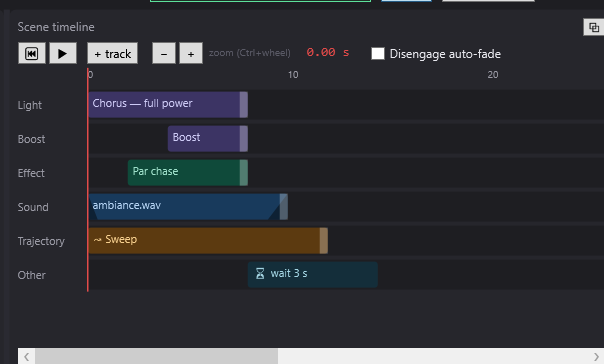
| Sound and video in the cue list | Yes: sound and video on the same timeline as the lighting (Windows screens and network video players) | Not found (synchronisation with Ableton Live, MIDI clock) |
| Programming | Timeline per scene + cue list (GO) | Cues and sequences |
| DMX outputs | Art-Net, sACN, USB interfaces (DMX USB Pro and compatibles, uDMX); unlimited universes | Art-Net, sACN, many USB interfaces |
| Languages | English, French, German, Spanish, Italian, Chinese | English, German, Italian |
The price, in practice
The two models are different. Lightkey is sold as a one-year licence, from €79 to €379 incl. VAT depending on the number of channels, according to the prices collected on 5 October 2026. Without paying, it gives all its features, with output limited to 24 channels: enough to drive a very small rig.
DreamShow is free, with no feature or time limit: no licence, no purchase, no subscription, no activation, and no channel or universe limit on the DMX output. You can prepare the whole show in 3D simulation, then drive the real equipment on show night with the same software.
What DreamShow does not do
- No Mac or Linux version.
- No RDM (remote addressing of fixtures), no MVR import, no Ableton Link.
- A library of about 1,600 fixture definitions, completed by GDTF and QLC+ import and a built-in editor.
- No dedicated hardware control surface: DreamShow is driven with the mouse, the keyboard, MIDI controllers, a web remote or OSC.
- Young software (2026): fewer tutorials and a smaller community than longer-established software.
Choose Lightkey if…
- your computer is a Mac;
- you play live with Ableton Live and want the lighting to synchronise with it;
- English, German or Italian suits you for the interface.
Choose DreamShow if…
- you work on Windows 10 or 11;
- you want sound and video on the same timeline as the lighting, with their fades, and videos on Windows screens or network video players: see Sound and video on the timeline;
- you want a photometric 3D simulation: illuminance in lux, pools of light on the floor and walls, to prepare the whole show without a single fixture plugged in. See 2D and 3D simulation;
- you play a show scene by scene, on GO, with a cue window readable from a distance;
- you want the interface in French, Spanish or Chinese;
- you want DMX output with no channel or universe limit, without paying anything.
Music and synchronisation in DreamShow
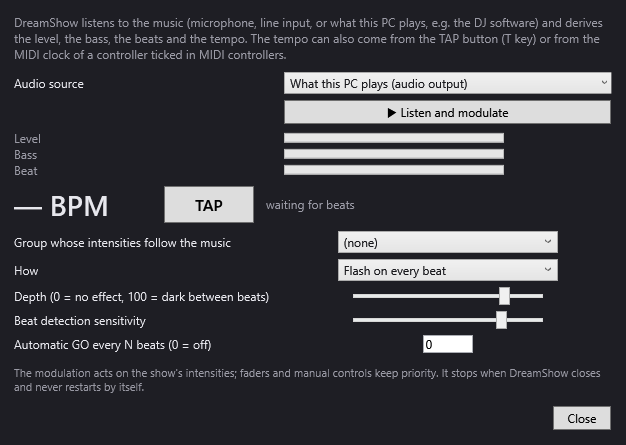
For a concert or a set, DreamShow offers several ways to follow the music:
- DMX > Sound-to-light and tempo…: the music (microphone, line input or what the PC is playing) varies the intensity of a group; the tempo is detected, tapped by hand or received from the MIDI clock, and can trigger a GO every N beats. See Sound-to-light and tempo.
- DMX > Timecode (LTC / MTC)…: a timecode coming from an audio track, a mixing desk or a program drives the show, each scene starting at its time. See Timecode.
- DMX > OSC remote…: TouchOSC, Companion (Stream Deck), QLab or Resolume control DreamShow and receive its state.
Frequently asked questions
Does DreamShow run on a Mac?
No. DreamShow only runs on Windows 10 and 11 (64-bit). If you work on a Mac, Lightkey is the one for you.
Lightkey is free up to 24 channels: what about DreamShow?
DreamShow is free with no channel limit: DMX output works on every universe, with no feature or time limit. Video players and stage devices are included too.
I play with Ableton Live: can DreamShow follow?
DreamShow has no Ableton Link. It can receive the MIDI clock of a program for the tempo, or an LTC or MTC timecode that makes each scene start at its time. Check it on your own setup: DreamShow is free.
Can I prepare on one PC and play on another?
Yes. DreamShow is free, so you can install it on as many computers as you like, for example the control PC and a preparation laptop. File > Export the whole project (zip)… takes the venue, shows, effects and media with you.
Try DreamShow on your own show
DreamShow is free, with no feature or time limit: from 3D preparation to show night.