DreamShow or FreeStyler DMX
FreeStyler DMX is free lighting software for Windows. DreamShow, also for Windows, is lighting, sound and video control software, free with no feature or time limit, DMX output included. Both are free: here are the differences, without bias.
In short
- You have an older computer or an unusual USB interface, and a small rig: FreeStyler is free, DMX output included, and states more than 15 USB interfaces.
- You want more than two universes, 3D in the same software, and the show's sound and video locked to the lighting: DreamShow is made for that, and it is free too, DMX output included, with no universe limit.
To see DreamShow at work before choosing: the presentation video.
The table
| DreamShow | FreeStyler DMX | |
|---|---|---|
| Price | Free, no feature or time limit | Free |
| Systems | Windows 10 and 11 | Windows (XP to 10 according to the publisher) |
| Without paying | Everything, no limit (DMX output, video and stage devices included) | Everything; 512 fixtures, 2 universes |
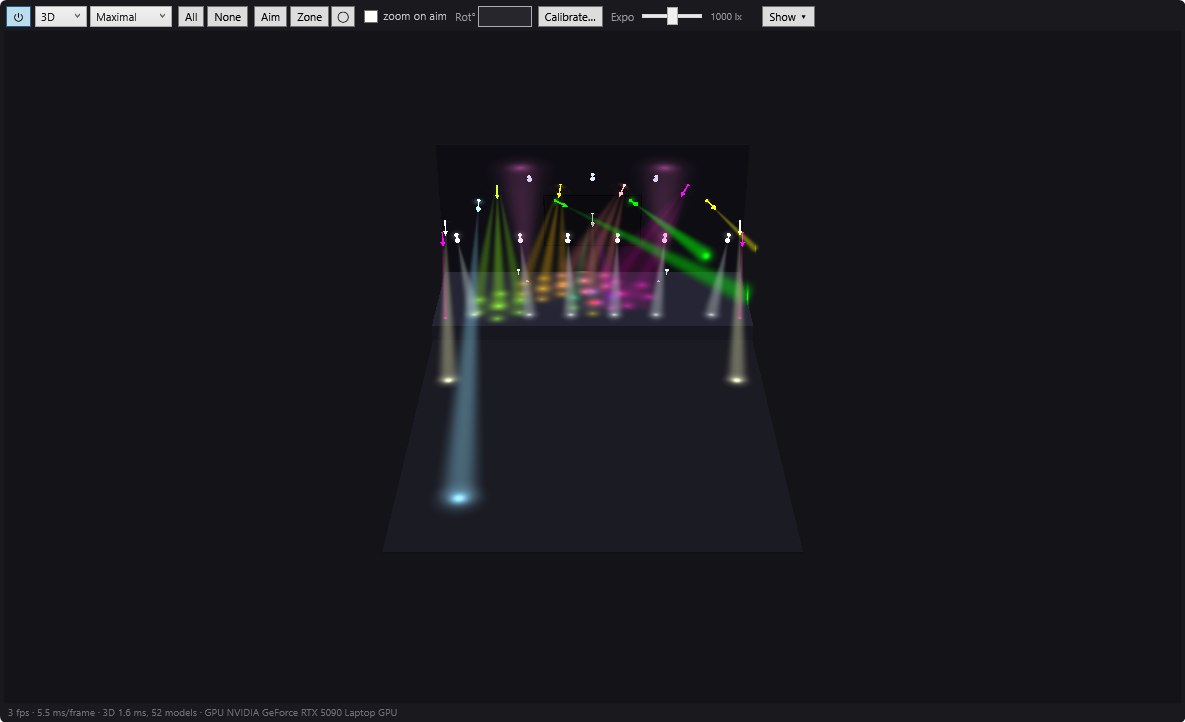
| 3D simulation | Yes, built in, photometric (illuminance in lux, pools of light on the floor and walls) | Through the separate software Magic 3D Easy View |
| Sound and video in the cue list | Yes: sound and video on the same timeline as the lighting (Windows screens and network video players) | Not found (tempo detection only) |
| Programming | Timeline per scene + cue list (GO) | Cues |
| DMX outputs | Art-Net, sACN, USB interfaces (DMX USB Pro and compatibles, uDMX); unlimited universes | Art-Net, sACN, more than 15 USB interfaces |
| Languages | English, French, German, Spanish, Italian, Chinese | Not stated |
What DreamShow does not do
- No Mac or Linux version.
- No RDM (remote addressing of fixtures), no MVR import, no Ableton Link.
- A library of about 1,600 fixture definitions, completed by GDTF and QLC+ import and a built-in editor.
- No dedicated hardware control surface: DreamShow is driven with the mouse, the keyboard, MIDI controllers, a web remote or OSC.
- Young software (2026): fewer tutorials and a smaller community than longer-established software.
Choose FreeStyler if…
- your computer runs a version of Windows older than Windows 10: DreamShow requires 64-bit Windows 10 or 11;
- your USB DMX interface is neither the DMX USB Pro type nor uDMX: FreeStyler states more than 15;
- your rig fits in two universes and you mostly work in cues;
- you already have your habits and files in FreeStyler, and the tutorials of an established community reassure you.
Choose DreamShow if…
- you have more than two universes, or you plan to grow: DreamShow does not limit the number of universes, in Art-Net, sACN or USB. See DMX connections;
- you want 3D in the same software, locked to the timeline, with a photometric simulation (lux, pools of light on the floor and walls): see 2D and 3D simulation;
- you want sound and video in the cue list: music, sound effects and videos sit on the same timeline as the lighting, with their fades;
- you play a scripted show, scene by scene, on GO, with a cue window readable from a distance: see Show mode and the cue window;
- you want the interface and a complete manual in English, French, German, Spanish, Italian or Chinese.
For parties: live music
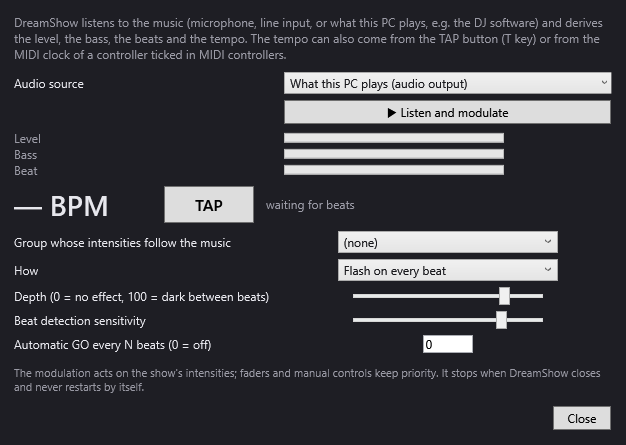
FreeStyler states tempo detection. DreamShow can also listen to the music: the DMX > Sound-to-light and tempo… window varies the intensity of a group of fixtures to the rhythm of the sound, and gives a tempo (detected in the music, tapped by hand or coming from the MIDI clock) that can trigger a GO every N beats. See Sound-to-light and tempo.
Frequently asked questions
Can I bring my fixtures over from FreeStyler?
The DreamShow manual lists three import formats: GDTF (.gdtf), QLC+ (.qxf) and DJworld (.fxt). FreeStyler's format is not one of them. First look for your model in Venue > Fixture library… (more than 1,600 definitions); if it is missing, import its GDTF profile from the manufacturer's website, or create it in the editor from the DMX table in its manual. See The fixture library.
What about my FreeStyler shows?
They cannot be imported as they are. But FreeStyler outputs Art-Net and sACN: DreamShow's visualiser mode (DMX > Visualiser mode (Art-Net / sACN in)…) can display that DMX in 3D and record it to a file, which you then place on a scene's timeline. DreamShow's venue must declare the same fixtures at the same addresses.
Both are free: which one should I pick?
If FreeStyler is enough for you, keep it. DreamShow adds more than two universes, built-in 3D, sound and video on the timeline, and cue-list playback on GO. It is free too, with no feature or time limit, so you can try it on your own show and decide.
Will my USB interface work with DreamShow?
DreamShow outputs to DMX USB Pro type interfaces (Enttec-compatible) and uDMX, and over the network in Art-Net or sACN. If your interface is of another type, an Art-Net node is one solution. The setting is made in Venue > DMX connections….
Try DreamShow on your own show
DreamShow is free, with no feature or time limit: from 3D preparation to show night.