Lighting software for DJs, parties and small concerts: sound-to-light, tempo and MIDI
Are you looking for lighting software for your DJ nights or small concerts? Let us say it up front: DreamShow is first and foremost show control software, built around a cue list of scenes that you prepare and then call. But it can also listen to the music live, pull the tempo out of it, make your fixtures pulse on the beats and change mood by itself every N bars. This page says what it does, and what it does not try to do.
What you need on a party night
The DJ plays and the lighting has to follow: PARs that hit on the kick drum, moving heads that move, LED bars that scroll, and now and then a change of mood at the right moment. Nobody has time to program during the night, and sometimes nobody is on the lights.
1. The music drives the intensities
The DMX > Sound-to-light and tempo… window listens to an audio source: What this PC plays (audio output), that is, the sound of the DJ software if it runs on the same computer, or a Windows input (microphone, line input of a sound card).
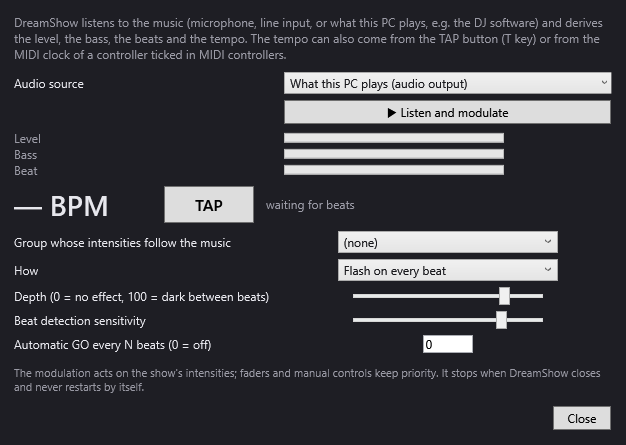
- Choose the group whose intensities follow the music, and how: Follow the level, Follow the bass or Flash on every beat.
- Set the Depth: at 0, nothing changes; at 100, the fixtures drop down to blackout between beats.
- The modulation only reduces what the current scene gives the group: a fixture that is off in the scene stays off. It acts on intensity only, not on colours or positions.
2. The tempo: detected, tapped or received over MIDI
The tempo is shown in BPM. It comes from detection in the bass (brought back to between 70 and 180 BPM), from the TAP button (or the T key), or from the MIDI clock of a mixing desk, a DJ program or a sequencer. The most recent source wins.
With Automatic GO every N beats, DreamShow moves to the next scene by itself: 32 beats is 8 bars of 4 beats. Prepare scenes on Loop (a looping scene accepts the Go at any time), open show mode, and the night moves forward at the pace of the music.
3. Moods that move by themselves
Each mood is a scene, with its timeline. To animate it:
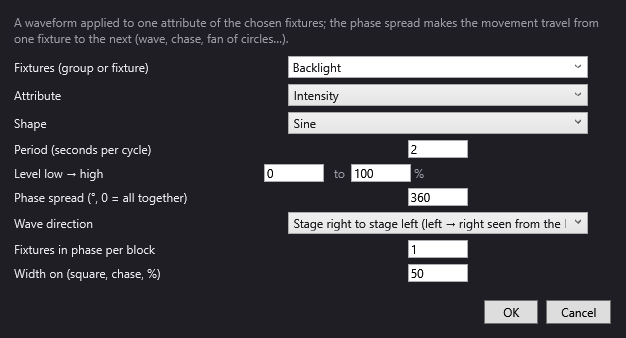
- Dynamic effects apply a wave to a group: intensity wave, chase, rainbow, circles or figure eights for the moving heads, with an offset that makes the movement travel from one fixture to the next. See Dynamic effects.
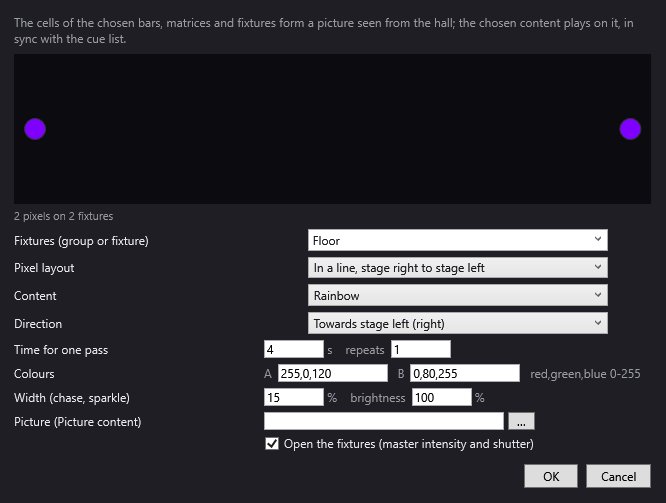
- Pixel mapping treats the cells of your LED bars and matrices like the pixels of a screen: rainbow, gradient, chase, sparkle, plasma, fire, or a scrolling image (a logo). See Pixel mapping.
- Trajectories and the Aim and Zone tools set the movements of the moving heads.
4. A MIDI controller under your fingers
In DMX > MIDI controllers…, each pad or fader of a USB controller is learned by touching it. Possible actions: GO, Previous scene, Go to scene no. (one pad per mood), Blackout, Pause, Play, DMX fader (universe.channel) (a fader for a channel), Give the channels back to the cue list and Tap tempo. When the controller allows it, its LEDs light up according to the state of the show. No special driver is needed. See MIDI controllers.
A phone can also serve as a remote (web remote), as can an OSC app (TouchOSC, Companion for Stream Deck).
5. For a concert written in advance
If you know the set list, the Create my first show wizard listens to each song and writes one scene per song, locked to its tempo and sections, then a Bows scene. Tick Play the songs one after the other by themselves for a set with no Go between titles. If backing tracks carry a timecode (LTC or MTC), DreamShow can also follow it. See the guide A lighting show set to a piece of music.
Good to know
- DreamShow is not first and foremost an improvisation tool. It asks you to prepare your moods as scenes, then call them (from a pad, with GO, or every N beats). If you are mainly looking for pages of effect buttons to trigger live, compare before choosing: see our comparison.
- Strobes are never switched on by the first-show wizard: a flash stays your decision.
- With a microphone, place it near the bass and away from the audience: a noisy room throws off beat detection.
- Listening never restarts by itself at the next launch: a forgotten setting cannot dim the start of a night. Remember to click ▶ Listen and modulate.
- DreamShow runs on Windows 10 and 11 only. If your DJ software runs on another computer, DreamShow can listen to its output through a line input on the PC.
- DreamShow is free, with no feature or time limit: DMX output to real equipment is included.
Frequently asked questions
Does DreamShow work with my DJ software?
It listens to what the PC plays, whatever the software. It can also receive the MIDI clock of a program or a mixing desk that sends it, through a controller or a MIDI interface ticked in DMX > MIDI controllers….
Can I change mood in time with the music?
Yes: Automatic GO every N beats moves to the next scene every N beats counted (detection, TAP or MIDI clock). It only works while listening, and follows the same rules as a Go given by hand.
Are my pixel LED bars supported?
Yes, if their definition describes their cells (red, green and blue channels of each cell): each cell becomes a pixel of the pixel mapping.
Do I need the Internet during the night?
No. DreamShow works entirely offline: no account and no activation are needed.
Try DreamShow on your own show
DreamShow is free, with no feature or time limit: from 3D preparation to show night.