Manual contents
Dynamic effects
A dynamic effect applies a waveform (sine, square, chase, random…) to an attribute of a group of fixtures: their intensity, their colour, their position. A phase spread makes the movement travel from one fixture to the next: an intensity wave, a chase, a scrolling rainbow, a fan of moving-head circles. The effect is a timeline block: it is placed, resized and faded like the others.
To open it: drag Dynamic effect… from the Others list (Libraries panel) onto a track of the Scene timeline panel. The Dynamic effect window opens; a double-click on the block reopens it.
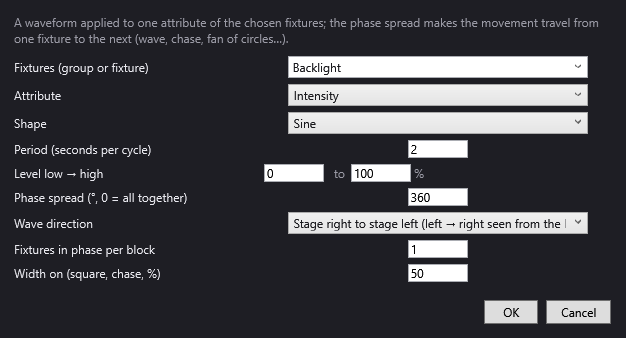
The “Dynamic effect” window
At the top, a reminder: “A waveform applied to one attribute of the chosen fixtures; the phase spread makes the movement travel from one fixture to the next (wave, chase, fan of circles…).”
Fixtures (group or fixture)
The group or fixture that plays the effect. The list first offers the venue's groups, then each fixture by its identifier; you can also type the name. It is mandatory (“Choose a group or a fixture.”). One group or fixture per effect: for two groups, place two effects.
Attribute
What the effect varies:
- Intensity (default): the fixtures' dimmer.
- Colour (pulse): the colour chosen in the Colour line, more or less bright according to the wave.
- Rainbow: the hue goes round the colour wheel at each period.
- Pan: the moving heads' horizontal position.
- Tilt: the moving heads' vertical position.
- Circle (pan + tilt): each moving head describes a circle.
- Figure eight (pan + tilt): each moving head describes a sideways figure eight (∞).
The effect sets only the channels of this attribute. The rest (colour, shutter, intensity…) comes from the scene's final state or from other blocks: to see moving heads move with Pan or Circle, they must be lit by other means.
Shape
The shape of the wave, over one period (greyed out for Rainbow, Circle and Figure eight, which have their own movement):
- Sine (default): soft rise and fall; each cycle starts at the low level.
- Triangle: rise then fall in a straight line.
- Square: on (high level) for the width on, then off (low level).
- Sawtooth: steady rise, then a sudden return to the bottom.
- Falling ramp: sudden return to the top, then a steady fall.
- Chase: like Square; with a phase spread and a short width, a single light runs from one fixture to the next.
- Random: a level drawn at random at each period, different for each fixture (or each block), held for the whole period.
Period (seconds per cycle)
Length of one wave cycle, in seconds (2 by default). Minimum 0.05 s (“Invalid period (at least 0.05 s).”). Short period = fast effect.
Level low → high
The wave's two limits, in % (0 to 100 by default):
- Intensity: minimum and maximum intensity;
- Colour (pulse): from the colour off (0 %) to the full colour (100 %);
- Pan and Tilt: the amplitude of the movement, as a % of the moving head's total range (for example 30 to 70 %);
- Rainbow: only the high level counts (the brightness of the colours);
- Circle and Figure eight: not used (see Centre and size).
Phase spread (°, 0 = all together)
The offset between the fixtures, in degrees of cycle (360 by default):
- 0: all fixtures do the same thing at the same time;
- 360: the fixtures are spread evenly over a complete cycle: a wave that runs through the whole group;
- 180: spread over half a cycle;
- beyond 360: several waves at once over the group.
With a positive spread, the wave runs through the fixtures in the order chosen in Wave direction (for example from stage right to stage left with “Stage right to stage left”); with a negative spread (-360), it runs through them the other way.
Wave direction
The order in which the fixtures receive their offset, from their position in the venue:
- Stage right to stage left (left → right seen from the hall) (default);
- Stage left to stage right;
- Downstage to upstage;
- From the centre outwards: those closest to the centre first; symmetrical fixtures receive neighbouring phases, which gives a mirror effect;
- Patch order: the order of the fixtures in the group.
The positions are those of Venue > Fixtures, addresses, positions….
Fixtures in phase per block
Number of neighbouring fixtures (in the chosen order) that share the same phase (1 by default). With 2, the fixtures go in pairs; with 4 on a bar of 12, the wave advances in blocks of 4.
Width on (square, chase, %)
For Square and Chase: the part of the cycle where the fixture is at the high level (50 % by default, minimum 2 %). For a chase with a single fixture lit out of N, set about 100/N %.
Colour
Visible only with Colour (pulse): the colour, as “red,green,blue 0-255” (255,255,255 by default, for example “255,80,0” for an orange).
Centre and size
Visible only with Circle and Figure eight:
- pan and tilt: the centre of the movement, as a % of the range (50 and 50 by default: the middle);
- radius: the size of the movement, as a % of the range (10 by default, at most 50).
For the Figure eight, the radius is the amplitude in pan; the amplitude in tilt is half of it.
OK / Cancel
OK checks the values and creates (or updates) the block. Cancel on creation: no block is created.
The block on the timeline
- Deep purple colour, text “∿ Intensity sine · Backlights · 2 s · 360°” (attribute, shape, target, period, spread).
- Initial length: 10 s. Resize it with the handle on the right edge: the wave continues for the whole length (20 minutes at most).
- Fades: right-click > Properties… gives Start (s), Length (s), Fade in (s) and Fade out (s). As for a light block, the fade only concerns intensity; a position (Pan, Circle…) applies from the start of the block.
- The effect is computed in advance, at 25 frames per second: it follows the red line, replays identically and is displayed in the simulation.
- It is laid on top of the light blocks and the final state, on the channels it sets (see Light and effect blocks). A Blackout switches it off.
- During a wait block, the effect stops on the spot.
Step by step
A soft wave on an LED cyclorama
- In the scene's final state, light the “Cyclo” group in blue at 100 %.
- Drag Dynamic effect… onto a track at 0 s.
- Fixtures: “Cyclo”; Attribute: Intensity; Shape: Sine; Period: 4; Level low → high: 20 to 100; Phase spread: 360; Wave direction: Stage right to stage left. OK.
- Resize the block to the length of the scene; right-click > Properties…, Fade in (s) 3.
If the cyclorama's fixtures have no dimmer channel (only red, green, blue), Intensity has no effect: use Colour (pulse) with the colour “0,0,255”.
A chase on a bar of 8 fixtures
- Attribute: Intensity; Shape: Chase; Period: 1; Level 0 to 100; Spread: 360; Width on: 12 (about 100/8).
- Light the bar in the final state (colour), with the effect doing the intensity.
A fan of circles with the moving heads
- In the final state, light the moving heads (intensity, colour, shutter open) and aim at the centre of the stage.
- Dynamic effect…: Attribute: Circle (pan + tilt); Period: 6; Spread: 90; Centre and size: pan 50, tilt 40, radius 8.
- The moving heads describe circles offset by a quarter turn from one another.
Random flashes
- Attribute: Intensity; Shape: Random; Period: 0.3; Level 0 to 100; Spread: 0; Fixtures in phase per block: 1.
- Each fixture takes a random level every 0.3 s.
Good to know
- A dynamic effect targets only one group or fixture. To chain two effects, place two blocks; two overlapping blocks do not mix with each other (mixing only concerns the light and effect blocks from the library).
- Square and Chase give the same result; the name only helps you remember the intention.
- With Colour (pulse) on a moving head with a colour wheel, DreamShow chooses the nearest wheel colour: the pulse may make the wheel change position.
- The effects in the Effects list (library) are fixed settings; dynamic effects are movements. They are not stored in the library: copy the track (right-click on its name > Copy the track) to reuse them in another scene.