Manual contents
Parallel sequences
A parallel sequence is a second playback that runs at the same time as the cue list: it plays a scene, then the following ones according to their automatic chains, while you keep advancing the cue list with GO. A typical example: a storm (lightning, thunder, rain) that starts during one scene and carries on through the next three scenes, whatever happens in the cue list, until a scene fades it out.
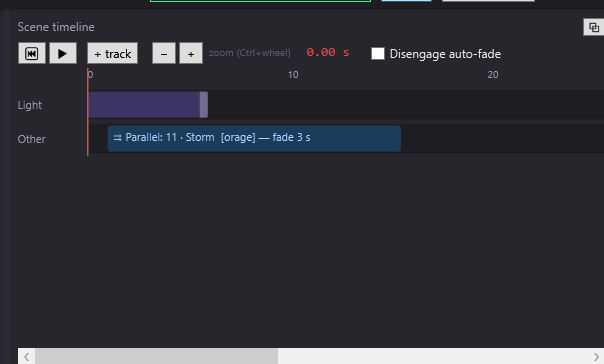
To open it: drag Start a parallel sequence… or End the parallel sequence… from the Others list (Libraries panel) onto a track of the Scene timeline panel. The settings window opens at once; double-click the block to reopen it.
The principle
- The scenes played by a parallel sequence are ordinary scenes of the show: you create and set them like the others (final state, timeline, sounds…).
- The Start a parallel sequence… block, placed in a scene of the cue list, launches the sequence from a chosen scene (its starting scene).
- The sequence plays this scene, then moves on to the following scenes by itself, according to their automatic triggers: Auto, Chained, Loop (and its max length), and the Go to scene… jumps placed in its scenes. A scene set to Manual GO stays in place: GO only advances the main cue list.
- The End the parallel sequence… block stops it, with a fade.
- A sequence is identified by its starting scene. Several sequences with different starting scenes can run at the same time.
Give a label to the starting scene (the Label: field of Scene settings, for example “storm”): the blocks find it again even if you insert or move scenes. See Jumps and scene labels.
Start a parallel sequence…
The “Start a parallel sequence” window
- Start (s): the moment the sequence starts, in the timeline of the scene that carries the block.
- Starting scene: the scene the sequence begins with (list “5 · Storm [storm]”). On creation, DreamShow suggests the scene that follows the selected scene.
- Fade in (s): the sequence's rise time (1 s suggested). 0 = it appears all at once.
- Help text: “The sequence plays this scene and then the following ones by their automatic triggers, at the same time as the main show. Go only moves the main show forward. Give the scene a label so that it stays targeted if the order changes.”
- OK / Cancel (cancelling at creation = no block).
The block shows “⇉ Parallèle : 5 · Storm [storm] — fondu 3 s” (the block text itself stays in French: Parallèle = parallel, fondu = fade).
If the same sequence is already running (same starting scene), the block restarts it from its first scene (its sounds and videos in progress are stopped), with the new fade in.
End the parallel sequence…
The “End the parallel sequence” window
- Start (s): the moment the sequence begins to fade out.
- Sequence to end:
- (the parallel sequence this block is in): to be used when the block is placed in a scene of the sequence itself; the sequence ends by itself;
- a scene from the list: to be used when the block is placed in the cue list; it ends the sequence started from that scene.
- Fade out (s): the time during which the sequence fades away (2 s suggested). 0 = it disappears all at once.
- Help text: “Placed in the parallel sequence, this block ends it; placed in the main show, it ends the sequence started from the chosen scene.”
The block shows “⇥ Fin parallèle : cette séquence — fondu 2 s” or “⇥ Fin parallèle : 5 · Storm [storm] — fondu 6 s” (“Fin parallèle” = end of parallel; “cette séquence” = this sequence).
At the end of the fade out, the sequence disappears and its sounds and videos are stopped (abruptly: the fade out concerns the light).
If the targeted sequence is not running, the block does nothing. A block set to (the parallel sequence this block is in) but placed in the cue list does nothing either, and the Log flags it: ““End the parallel sequence” with no sequence to end: place it in the parallel sequence, or name its starting scene.”
The ⏮ Reset (Ready) of the cue window stops all parallel sequences. A GO, a jump or a scene change in the cue list does not stop them.
What a sequence plays
In each of its scenes, a sequence plays:
- the scene's final state, but only for what it sets (fixtures absent from its final state are not set to zero: they stay with the cue list);
- its light and effect blocks, trajectories, dynamic effects, pixel mappings and Blackout (a Blackout there only turns off the sequence itself);
- its sounds and videos (they are noted in the Log: ““storm”: playing tonnerre.wav”), the Backstage display…, Robot and Mask blocks, the blocks that start or end other sequences, and the EXEC= extra command.
It moves from one scene to the next with the Fade to the next of the scene being left; a Go to scene… jump there is instantaneous.
What a sequence ignores (with a warning in the Log, once per sequence): waits (Wait for a key…, Wait for a time, a date, the sun…), the old Pause block, and the extra commands that take over the whole show (CHAIN=, REPLAYDMX=, AMBILIGHT=). Message: “Parallel sequence “…”: “…” ignored (only the main show can wait or chain).”
Also not played in a sequence: DMX recordings (▦ blocks). And two light blocks that overlap there only make an intensity fade (no colour or position mix).
Mixing with the cue list
The sequence mixes with the cue list according to the usual lighting-control rules:
- Intensity and colour mixing (dimmer, red, green, blue, white…; channel by channel): the highest wins (“HTP” mode, for highest takes precedence). The sequence can therefore only add light: it never darkens the cue list. Example: the cue list sets the front light to red, the sequence sets it to blue on the same fixtures → the front light becomes magenta.
- All the other channels (position, zoom, colour and gobo wheels, shutter…): the sequence wins on the channels it sets (“LTP” mode, for latest takes precedence). During the sequence's fade in or fade out, a position slides between the cue list and the sequence; a wheel or a shutter switches halfway through the fade.
- The general blackout (the cue window's BLACKOUT button) and the manual controls win over both.
- A Blackout block in the cue list does not turn off the parallel sequences.
To avoid surprises, have a sequence play fixtures of its own (for example the backlights for a storm), or accept that the position of those fixtures comes from the sequence as long as it is running.
Where to see the running sequences
- In the editor: the information line at the top of the window (to the right of the show's name) adds “· ⇉ en parallèle : storm” (“en parallèle” = in parallel; the label of the starting scene, or its name).
- In the cue window: the top line adds “⇉ en parallèle : storm”.
- In the Log: “Parallel sequence “storm” started (scene 5), fade 3 s”, then “Parallel sequence “storm” ended, fade 6 s”.
Pauses and the editor
A parallel sequence follows the engine's clock: it freezes whenever the cue list is paused (the editor's ⏸ button, a stop at the end of the timeline in the editor, a wait block in the cue list), and restarts with it.
In the editor, a scene set to Manual GO stops playback at the end of its timeline: the parallel sequence therefore stops too. To watch a sequence evolve for a long time, switch to Show mode (the cue list runs without stopping), or set the cue list's scene to Loop for the duration of the rehearsal.
The Disengage auto-fade box also blocks the sequences' automatic chains (a scene set to Loop keeps looping).
Complete example: a storm that carries on while the cue list moves forward
The show: a peaceful village, the storm breaks during scene 1, lasts through the argument in scene 2, and calms down at the start of scene 3. The groups “Front”, “Cyc” and “Backlights” exist in the venue; the backlights are reserved for the storm. The sounds “pluie.wav” (rain) and “tonnerre.wav” (thunder) are in the show's media.
The scenes
| No. | Name | Label | Trigger | Role |
|---|---|---|---|---|
| 1 | Village | Manual GO | starts the storm | |
| 2 | Argument | Manual GO | the storm carries on | |
| 3 | Lull | Manual GO | ends the storm | |
| 4 | Bows | Manual GO | last scene played by the cue list | |
| 5 | Storm | storm | Manual GO, Loop | the parallel sequence |
Step by step
- Create scene 5 “Storm” (after “Bows”):
- Label: “storm”; tick Loop, leave max length (s): empty.
- Final state: empty (the storm only lights with its blocks).
- “Lightning” track: drag “Backlights” from Groups at 2 s. If “Backlights” is not set in any scene, the block is white at 100 % by default; otherwise, set it to white at 100 % with Replace with the current selection + settings (see Light and effect blocks). Set its Length (s) to 0.2. Drop two other flashes in the same way, at 2.4 s and 7.5 s.
- “Sounds” track: “tonnerre.wav” at 2.6 s; on a “Rain” track, “pluie.wav” from 0 to 12 s with Fade in (s) and Fade out (s) of 0.5.
- The timeline lasts 12 s (end of the rain sound): the scene loops every 12 s.
- Scene 1 “Village”: final state Front 70 % warm, Cyc sky blue. Drag Start a parallel sequence… onto a track at 15 s; Starting scene: “5 · Storm [storm]”; Fade in (s): 3.
- Scene 2 “Argument”: its usual lighting. Nothing to do for the storm: it carries on.
- Scene 3 “Lull”: drag End the parallel sequence… at 0 s; Sequence to end: “5 · Storm [storm]”; Fade out (s): 6.
- Try it in Show mode: click Show mode, then GO. At 15 s in “Village”, the top line shows “⇉ en parallèle : storm”, the lightning and the rain come up over 3 s. GO to “Argument”: the front light changes, the storm carries on (it loops every 12 s). GO to “Lull”: the storm fades away over 6 s, then the rain stops.
During the storm, the backlights come from the sequence; the front light and the cyc stay those of the cue list (the sequence does not set those fixtures).
Variant: a sequence that ends by itself
For a two-part fireworks display: scene “Fireworks 1” (label “fireworks”, Chained) then “Fireworks 2”; at the end of the timeline of “Fireworks 2”, place End the parallel sequence… set to (the parallel sequence this block is in). The sequence plays “Fireworks 1”, chains on to “Fireworks 2”, then fades away.
Good to know
- A sequence's scenes are part of the show's list: the cue list can also reach them with GO. Put them after the last scene of the cue list, and do not GO beyond it. The “END OF SHOW” message in the cue window only appears on arriving at the last scene of the list.
- To set up a sequence scene, select it in the Scenes panel: the editor then plays it in the main cue list, like any scene.
- A parallel sequence can itself start or end other sequences.
- If the sequence arrives at the last scene of the list, it stays there.