Manual contents
Humanoid robots
DreamShow drives Booster K1 humanoid robots from the timeline: standing up, speaking (with a sound file), dancing, waving, walking, turning the head… Each action is a Robot… block placed at the right moment of the scene, synchronised with the light, the sound and, if you wish, the mouth of an LED mask. As a safety measure, a robot only moves if the control PC has armed it.
The robot must run the DreamShow service (the dreamshow_robot.py program installed on the robot, started at boot). DreamShow sends it simple orders over the network; the robot must therefore be on the same network as the control PC.
The service is installed once on the robot. It is supplied by Polux: ask support, who will tell you how to install it.
To open it: menu Venue > Robots… (tooltip: “Humanoid robots (Booster K1) driven by the DreamShow service installed on the robot. The “Robot…” blocks of the timeline drive them.”).
Several labels of the robot windows are not translated in the software and stay in French on screen; they are given below in French, with their translation in brackets the first time.
The Robots window
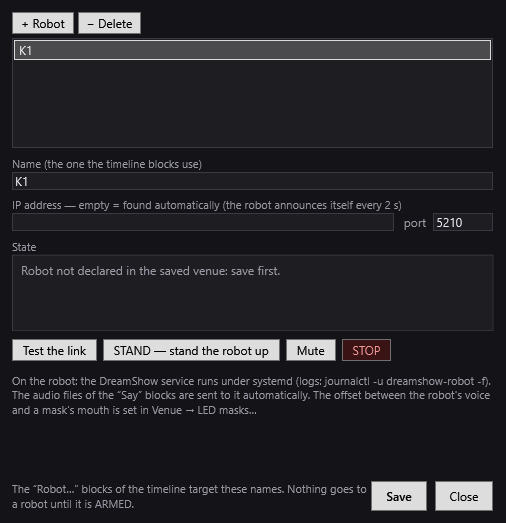
The title reminds you of the venue: “Robots: <venue>”. An asterisk * flags unsaved changes.
- The list of the robots declared in the venue.
- + Robot: adds a robot named “K1” (then “K1 2”…) and selects it.
- − Delete: removes the selected robot.
- Name (the one the timeline blocks use): the name the Robot… blocks use to target this robot.
- IP address — empty = found automatically (the robot announces itself every 2 s): leave empty in the usual case. The robot's service announces itself on the network; DreamShow keeps the address of the announcement that carries the same name, or, if the venue has only one robot, that of any robot that announces itself. An address typed here turns off the automatic search.
- port (tooltip “TCP port of the service (5210 by default)”): only change it if the robot's service has been set up differently.
State
The State frame updates continuously (for the selected robot):
- “Robot not declared in the saved venue: save first.”: click Save.
- “Waiting for the robot to announce itself on the network (UDP 5211)… Is the dreamshow_robot.py service running? Same network as the console?”: DreamShow has not yet received any announcement.
- “Unreachable: address:port” followed by the error, in red: the address is known but the robot does not answer.
- “Connected address:port”, in green, then:
- “(SIMULATION, no SDK)” if the service runs without driving a real robot;
- Mode (for example Damping for damped, Prepare for standing) and Batterie (Battery) in %;
- “⚠ AU SOL” (ON THE FLOOR) in red if the robot has fallen;
- “En cours : …” (in progress: the current action) or “Inactif” (idle);
- “ARMED” or “disarmed”;
- idling: “idling stopped”, “idle: head” or “idle: head + arms”, with “(waiting for run mode)” if it is waiting for walking mode;
- “Last error: …” where applicable.
The test buttons
- Test the link: sends a simple call to the robot (it goes through even when disarmed).
- STAND — stand the robot up (tooltip “Puts the robot in standing mode (PREP). Asks for confirmation.”): a warning window reminds you that the robot is going to STIFFEN and take the standing position, that you must put it on the ground with its feet flat or hold it by the handle on its back, clear 2 m, keep the controller in your hand (LT + BACK puts it back to damping), that it holds its posture but does not catch an imbalance (it is the walking mode, LT + RT + A, that does that), and that it must be ARMED for the order to go out. OK sends the order, Cancel (the default choice) sends nothing.
- Mute: stops the sound the robot is playing (goes through even when disarmed).
- STOP (in red): immediate stop of movement and sound, even when disarmed.
The text at the bottom reminds you that the service runs on the robot under systemd (logs: journalctl -u dreamshow-robot -f), that the audio files of the “Dire” (Say) blocks are sent automatically, and that the offset between the robot's voice and a mask's mouth is set in Venue > LED masks….
- Save: saves the robots in the venue (robots with no name are removed) and restarts the link.
- Close: if changes remain, DreamShow asks “Changes not saved. Save?”.
At the bottom of the window: “The “Robot…” blocks of the timeline target these names. Nothing goes to a robot until it is ARMED.”
Test mode
Before putting a move into a show, try it here to see whether it shifts the robot. A kick, a dance or being picked up can make it slide or turn, and the rest of the show then plays in the wrong place.
- Put the robot on its mark, then click 📍 Mark its position. It remembers where it stands, without moving.
- Pick a move in the list (kicks, dances, gestures, get up, get ready), then click ▶ Try. A window describes the move and recalls the precautions before the order goes out.
- Read under the buttons how far it moved, for example "From its mark: 23 cm forward, 8 cm to the left, turned 15° to the left". Beyond 10 cm or 10°, the line turns orange.
- ↩ Back to its mark makes it walk straight to its mark, without turning round, then take back the heading it had; it corrects in two or three small passes at most. One return at a time: the button stays greyed out on the way. It must be in walk mode, and the mark 1.5 m away at most; further, put it back by hand.
If a move shifts the robot, add two Robot… blocks to the timeline: Mark its position at the start of the show, and Back to its mark after that move.
The position comes from the robot's odometry: expect a few centimetres of error, a little more after a sudden move. The robot must be armed for the moves to go out; marking its position works even disarmed, since it does not move it.
Test mode needs a recent version of the robot's service; with an older service, the window says so: ask the support for its update.
Arming 🤖
As soon as the venue declares a robot, a button appears at the top right of the main screen, next to LIVE:
- 🤖 disarmed (normal appearance): the timeline's Robot blocks are ignored. You rehearse the light and the sound without the robot moving. The log notes each order set aside: “… DISARMED — command ignored: …”.
- 🤖 ARMED (red background): the Robot blocks are executed.
One click switches from one to the other. The button also shows the state of the first robot: “· not found”, “· hors ligne” (offline), or the mode and the battery (for example “· Prepare 82 %”), “⚠ AU SOL”, “(simu)”.
The log notes “Robots ARMED — the Robot blocks are executed” or “Robots disarmed — the Robot blocks are ignored”.
DreamShow always starts disarmed: you have to arm deliberately at each session.
In the cue window (Show mode)
The cue window also shows:
- the 🤖 Robot disarmed / 🤖 Robot ARMED button (red when armed), with the robot's state; a click arms or disarms;
- a red ⛔ EMERGENCY — <name> button per robot (and ⛔ EMERGENCY — ALL if there are several): “immediate stop then motors off (the robot slumps). Goes through even when disarmed.”.
The Robot… blocks
In the Libraries panel, the Others list contains Robot…. Drag it onto a timeline track: the Robot block window opens at once (if you cancel it, no block is created). To modify a block: double-click, or right-click > Properties….
On the timeline, the block shows 🤖, the robot's name and the action, for example “🤖 K1 : Danse : Michael Jackson (partie 1)”, with “+ 🎭 <mask>” and “+ sono” for a line accompanied by sound.
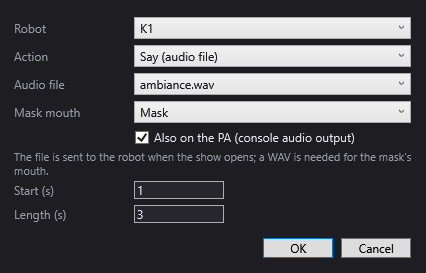
The common settings
- Robot: the robot targeted. If the venue declares none, the window says so.
- Action (action): the action (list below). Changing the action rebuilds the settings specific to the action.
- Start (s): the moment, from the start of the scene, when the order goes out.
- Length (s): the length of the block on the timeline. It is filled in automatically according to the action (and the length of the file for “Say”) as long as you do not change it yourself. It is used to place the following blocks; the robot, for its part, carries out its action at its own pace.
- OK / Cancel.
The actions
| Action | Settings | Suggested length |
|---|---|---|
| Prepare (ready to move) | — | 5 s |
| Se lever (get up) | — | 8 s |
| Lie down ⚠ not on K1 | — | 6 s |
| Say (audio file) | Audio file, Mask mouth, Also on the PA (console audio output) | length of the file |
| Danser (dance) | Danse (dance) | depends on the dance |
| Boxing / kick | Mouvement (movement) | 6 s |
| Geste (gesture) | Geste | depends on the gesture |
| Head (tilt, rotation) | Tilt (°), Rotation (°) | 1 s |
| Avancer / reculer (m) (move forward / back) | Distance (m) | distance ÷ 0.2 m/s + 1 s |
| Turn (°) | Angle (°) | angle ÷ 25 °/s + 1 s |
| Mode (debout, marche, amorti) (mode: standing, walking, damping) | Mode | 1 to 3 s |
| Veille (petits mouvements) (idle: small movements) | Veille (idle) | 0 s |
| Stop (movement and sound) | — | 0 s |
| Mute the robot | — | 0 s |
Details of the actions:
- Prepare (ready to move): puts the robot in the ready-to-move posture. It is essential before a dance, a kick, a gesture or a walk.
- Se lever (get up): raises the robot when seated or lying, on its back as well as on its front.
- Lie down ⚠ not on K1: the window warns in red that the K1 cannot lie down (the command is empty at the manufacturer's and a standing robot would risk falling): the service refuses it. Lay the robot down by hand, in damping mode.
- Say (audio file):
- Audio file: one of the sound files in the show's media folder (“No audio file in the show's media folder.” if there is none). The robot plays it through its own loudspeaker.
- Mask mouth: “(none)” or an LED mask of the venue, whose mouth will move to that same file. The mouth requires a WAV file.
- Also on the PA (console audio output): also plays the file on the PC's sound output, at the same moment, like a sound block.
- The reminder: “The file is sent to the robot when the show opens; a WAV is needed for the mask's mouth.”
- Danser (dance) — Danse: Michael Jackson (parts 1 and 2) 57.6 s, “Michael Jackson (partie 1)” 21.5 s, “Michael Jackson (partie 2)” 30.3 s, “Michael Jackson (partie 3)”, “Danse arabe” (Arabic dance), “Shan He Gu Ren”, “Gai Ge Chun Feng” (about 30 s each). “Robot standing and stable, 2 m clear. “~” = length to be measured.”: the lengths marked ~ are estimates.
- Boxing / kick — Mouvement (movement): Boxing kick, Roundhouse kick. “Robot standing and stable, 2 m clear: a kick moves the centre of gravity.”
- Geste (gesture) — Geste: Wave, Handshake (4 s), New year dance, “Danse Nezha”, “Danse Towards Future” (about 20 s), “Dab”, “Ultraman”, “Salut respectueux” (respectful bow), “Encouragement” (cheering), “Chat porte-bonheur” (lucky cat, 3 s).
- Head (tilt, rotation): “Positive tilt = head down; positive rotation = to the left.”
- Avancer / reculer (m) (move forward / back): “Negative = backwards. Walks at 0.2 m/s, stops on odometry (± 5 cm).” Suggested value: 0.5 m.
- Turn (°): “Positive = to the left.” Suggested value: 90°.
- Mode (debout, marche, amorti) (mode): “Debout (PREP)” (standing), “Marche (WALK)” (walking), Damping (DAMP) — the robot slumps.
- Veille (petits mouvements) (idle: small movements) — Veille: Head only, Head and arms, Tête, bras et jambes (head, arms and legs), Stopped. When idling, the robot slowly looks around when it has nothing else to do (the head turns up to 18°), to seem alive; with the arms, a 3.5° breathing at the shoulders and a slow 7° sway are added, faded in over 6 seconds; with the legs (this choice includes the arms), the robot drives no leg joint — that is impossible on the K1 — but every 15 to 35 seconds it briefly hands the arms back to its own controller and takes them again, which makes its balance settle again: the hips and the lower body really move, without it leaving its mark. Idling pauses during each action, requires walking mode, and stops on a STOP.
- Stop (movement and sound): “Immediate stop of movement and sound (sent even when disarmed).”
- Mute the robot: stops the sound only.
Sound files and masks' mouths
- When the show opens (and after each change), DreamShow sends the robot, in the background, the files of the “Dire” (Say) blocks it does not yet have, as soon as the robot is found on the network. The log notes ““…” sent to K1”.
- For a line accompanied by a mask's mouth, MaskCtl calculates the mouth sequence from the WAV file (see LED masks). If the file is not a WAV, the log flags it: “the mask's mouth needs a WAV file (MaskCtl does not read MP3)”.
- The Robot voice → mouth offset (ms):, set in Venue > LED masks…, aligns the mouth with the robot's real voice: positive, the mouth starts later; negative, the order to the robot goes out earlier.
Step by step
Making the robot wave and speak at curtain-up
- Switch the robot on, check that it is on the same network as the PC.
- Open Venue > Robots…, click + Robot, then Save. Wait for “Connected …” in State; click Test the link.
- Copy the line (preferably as a WAV) into the show's media folder.
- In the scene, drag Robot… onto a track at 0 s: action Se lever, OK.
- At 8 s, add a Prepare (ready to move) block.
- At 13 s, a Geste > Wave block.
- At 17 s, a Say (audio file) block with the line; tick Also on the PA if the audience must hear it through the sound system.
- Rehearse disarmed: the light and the sound run, the robot does not move.
- Robot placed on the ground, 2 m clear, controller in hand: click 🤖 disarmed to switch to 🤖 ARMED, and replay the scene.
Good to know
- Safety: when disarmed, no movement order goes out; only the test call, Mute and STOP always go through. The emergency stop in the cue window also always goes through.
- An order sent to an unreachable robot is lost: “… unreachable — command lost: …” in the log.
- The lengths marked “~” are estimates: measure them on your robot and adjust the length of the blocks.
- The show can be prepared and simulated without a robot.
- At first start, the Windows firewall may ask you to allow DreamShow on the network: accept (ports used: TCP 5210 to the robot, UDP 5211 for its announcements).