Manual contents
Waits (key, time, date, sun)
A wait block stops the scene's timeline at a precise point until a condition is met: the press of a chosen key (Wait for a key…), or a moment on the calendar (Wait for a time, a date, the sun…): a length of time, a time of day, a date of the year, sunrise or sunset. The second kind of wait restarts by itself, with nobody at the control desk: it is the basis of architectural lighting.
To open it: drag Wait for a key… or Wait for a time, a date, the sun… from the Others list (Libraries panel) onto a track of the Scene timeline panel. The settings window opens at once; double-click the block to reopen it.
What happens during a wait
When the red line reaches a wait block:
- the scene's timeline stops at that point: the following blocks do not start;
- the light stays as it is at that instant (final state, plus the blocks in progress, frozen at their position; a dynamic effect stops on the spot); the DMX output carries on normally;
- the scene's sounds and videos are paused, and resume when the wait ends;
- any parallel sequences in progress also freeze until the wait ends;
- when the wait ends, the timeline carries on exactly where it stopped.
A wait is an instantaneous event: only its start counts.
Wait for a key…
Stops the scene until the operator presses a specific key on the keyboard. Useful for waiting for a signal from the stage without leaving the scene (end of applause, an actor's entrance).
The “Wait for a key” window
- Start (s): the moment when the scene stops.
- Key: the key awaited (Space by default). To change it, click Set… (the button shows “Press a key…”), then press the key you want. This deliberate capture avoids recording Tab, Enter or Esc by mistake while moving around the window. Keys are displayed by name: Space, Enter, Esc, Backspace, Page ↓, Page ↑, ← Left, Right →; the others under their Windows name (for example “F5”, “A”, “D1” for the 1 key of the main keyboard).
- Message while waiting: text displayed during the wait (optional), for example “Wait for the end of the applause”.
- OK / Cancel.
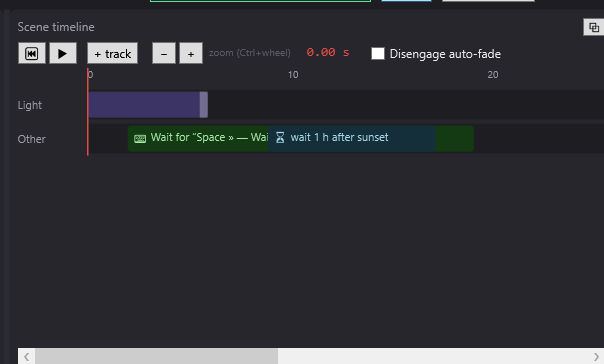
The block shows “⌨ Wait for “Space” — start of the message”.
During the wait
- In the cue window, the message area shows your message in large type, with the key (“⌨ “Space””); with no message, it shows “⌨ Press “Space””.
- In the editor, the red line's position is replaced by “⌨ wait “message” → “Space””.
- The wait is released when that key is pressed, with the DreamShow window (editor or cue window) in focus. Any other key does nothing.
- The awaited key is served first: if it is also the GO key, it releases the wait without triggering a GO.
- An OSC remote can also release the wait with the command
/dreamshow/keyfollowed by the Windows name of the key (Space, F5…). See The OSC remote. - A presentation remote usually sends Page ↓: choose that key to release the wait with the remote. See The remote (GO keys).
Wait for a time, a date, the sun…
Stops the scene until a given moment, then restarts by itself, with no GO. Block tooltip: “The show resumes by itself when the time comes; GO overrides it.”
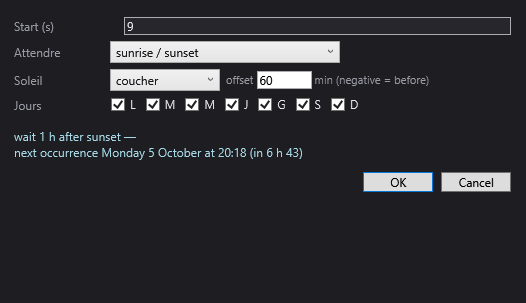
The “Wait for a time, a date, the sun” window
- Start (s): the moment when the scene stops.
- “Attendre” (Wait for): the kind of rule. Depending on the choice, only one of the following lines is displayed.
- a length of time: Length line. The waiting time, counted from the moment the red line reaches the block. Accepted notations: “90” or “90 s” (seconds), “5 min” (or “5 m”, “5 mn”), “2 h”, “1h30”, “1:30” (= 1 h 30), “01:30:00”. Suggested value: “1 h”.
- a time of day (default choice on creation): “Heure” (Time) line, in the format “hh:mm” (“18:30”; “18h30” and “18h” are also accepted). Suggested value: 18:30.
- a date (every year): “Date” line, in the format “dd/mm [hh:mm]” (“jj/mm [hh:mm]” on screen), for example “24/12 18:00”. The time is optional (no time: midnight, at the start of the day). The rule comes back every year. 29/02 is only reached in leap years. Suggested value: “24/12 18:00”.
- sunrise / sunset: “Soleil” (Sun) line, with the sunset / sunrise list and the offset in minutes (“min (negative = before)”): 60 = one hour after, -15 = a quarter of an hour before. Suggested value: 60.
- “Jours” (Days) (for a time of day and sunrise / sunset only): L M M J V S D boxes (Monday to Sunday, French initials). Untick the days on which the rule must not apply: for example everything except S and D for “weekdays only”. All ticked, or all unticked, means “every day”.
- The preview (blue text at the bottom): the rule in plain words and its next occurrence, for example “wait until 18:30 (except Sat, Sun) — next occurrence Monday 6 October at 18:30 (in 3 h 12)”. It updates at every change. If the rule is impossible (badly written time…), it shows “rule impossible to satisfy: the block would be ignored when reached”.
- OK / Cancel.
The block shows the rule: “⏳ wait until 18:30 (except Sat, Sun)”, “⏳ wait 1 h after sunset”, “⏳ wait for 24 December 18:00 (every year)”, “⏳ wait 5 min”…
The next occurrence
The deadline is computed at the moment the red line reaches the block, never before: a show prepared at noon does wait for “the next 18:30” when it passes over the block at midnight.
And it is always the next occurrence, never one that has already gone by. If the “wait until 18:30” block is reached at 18:31, or if the computer restarts at 23:00, it waits for 18:30 the next day (respecting the ticked days). This fixed rule makes unattended installations predictable.
Sunrise and sunset
They are computed for the venue's location, every day, without the Internet (official times, accurate to within a minute; daylight saving time is handled by Windows).
Set the location in Venue > Fixtures, addresses, positions…, fields Location (°) — latitude and longitude (“north and east positive — used to compute sunrise and sunset”). Example: Paris = 48.85 and 2.35. With no setting, the venue has coordinates in the south of France (44.126 and 4.082). See Fixtures, addresses, positions.
During the wait
- In the editor, the red line's position is replaced by the rule and the deadline: “⏳ wait until 18:30 → Mon 18:30 (in 3 h 12)”.
- The Log notes the start (“Waiting: … → resumes … (in …).”) and the end (“Wait finished (…) — resuming.”).
- At the deadline, the engine restarts by itself, even if nobody is there, even if a window is open.
- An impossible rule never blocks the show: the block is ignored when reached, with a warning in the Log (“Wait block impossible to satisfy (…): it is ignored.”).
GO, scene changes and waits
- A GO leaves the scene for the next one, and cancels the wait in progress. But GO is only allowed when the scene's timeline has finished (or the scene is on Loop): if the wait block is the last element of the timeline, GO is possible during the wait; if there are other blocks after it, the GO button stays greyed out until the wait ends.
- Entering another scene (GO, jump, choosing a scene in the editor) always cancels the wait in progress.
- In the editor, ▶ cancels the wait and restarts playback without waiting for the deadline or the key: the red line's position is displayed again in place of the wait text.
Waits and automatic chaining
A scene set to Auto or Chained counts its delay in timeline time, and that time stops during the wait:
- Auto: place the wait before the delay. Example: wait at 0 s, Auto with a delay of 2 s → the scene waits, then moves on to the next one 2 s after the wait ends, with its fade.
- Chained: the scene leaves at the end of its last block; there must therefore be at least one block that ends after the wait.
Never place the wait at the very end of the timeline of a Chained scene (nor at the very moment of the delay of an Auto scene): the scene would leave for the next one at once, without waiting, and the next one would stay stopped at 0 s until a GO.
In a parallel sequence
A parallel sequence cannot wait: any wait blocks (key or calendar) it meets are ignored, with a warning in the Log. On the other hand, a wait in the main show also freezes the parallel sequences until it ends. See Parallel sequences.
Step by step
Waiting for the end of the applause
- In the “Bows” scene, drop Wait for a key… at 4 s.
- Keep Space, write the message “Restart at the end of the applause”. OK.
- Drop after it, at 5 s, the lighting block for the curtain call.
- In performance, the scene stops at 4 s and the cue window shows the message; Space restarts the rest.
Switching on a facade a quarter of an hour before sunset, on weekdays
- Set the venue's latitude and longitude (Venue > Fixtures, addresses, positions…).
- Scene 1 “Evening wait”: empty timeline, final state off. Drop Wait for a time, a date, the sun… at 0 s.
- Choose sunrise / sunset, sunset, offset -15, untick S and D. Check the preview. OK.
- In Scene settings, Trigger: Auto, delay 2; Fade to the next (s): 10.
- Scene 2 “Facade”: the lighting you want.
- When evening comes, scene 1 is released, then the facade lights up over 10 s.
The complete recipe, with switching off and starting over every day, is in Architectural lighting.
A timed pause
- Drop Wait for a time, a date, the sun…, choose a length of time, write “20 min”.
- The show restarts by itself 20 minutes after reaching the block. If the block is the last element of the scene, a GO lets you move on to the next scene without waiting for the end.
Good to know
- During a wait, the picture is frozen: a dynamic effect, a trajectory or a pixel mapping stops on the spot. For lighting that must stay animated during a long wait, prefer a scene on Loop with a max length (see Architectural lighting).
- The cue window does not show the countdown of a time-of-day wait: it is visible in the editor (red line position) and in the Log.
- The export for a standalone player computes the show in advance: time-of-day waits are ignored there. The player has its own time schedule, see The standalone player.
- Date rules have no day filter; neither do length-of-time rules.
- Imported shows may contain an old “⏸ Pause” block (window title “Pause (wait)”): it stops the timeline until ▶ in the editor or a GO. It is no longer offered in the Others list; replace it with Wait for a key….