Manual contents
Manual controls
Some devices must not follow the cue list: a winch, the power supply of the moving heads, a relay, a mechanical shutter… The Manual controls window takes them out of the cue list and lets you drive them by hand. Their channels are forced permanently on the DMX output, whatever scene is playing, even during a general blackout.
To open it: menu Venue > Manual controls…, or the Manual controls… button of the cue window (show mode). The window does not block the main screen; if it is already open, the menu brings it to the front.
The principle
- A manual fixture is no longer driven by the scenes: its channels take the values set in this window, at every DMX frame, on top of the cue list.
- These values go out even during a general blackout: a winch does not come back down and a power supply does not switch off because you blacked out.
- Two things still go on top of the manual controls: the follow spot on a tablet and the DMX faders (DMX menu), which override everything.
- Every setting is applied at once and saved immediately in the venue file: it is found again at the next launch.
- Manual fixtures are never switched on by the moods written automatically (first-show assistant).
The window
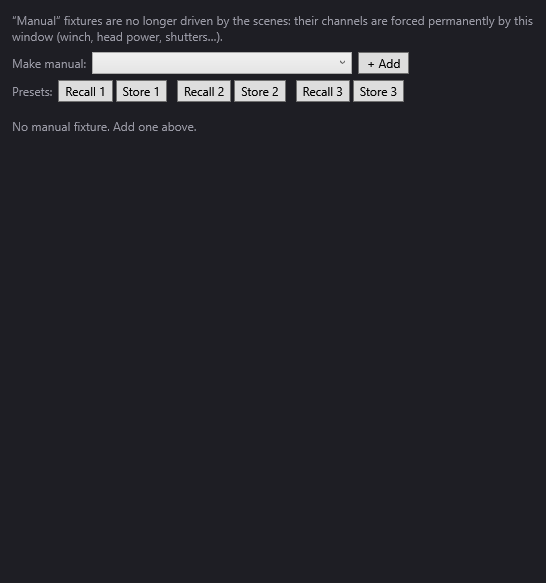
At the top, a reminder: ““Manual” fixtures are no longer driven by the scenes: their channels are forced permanently by this window (winch, head power, shutters…).”
Making a fixture manual
- Make manual: list of the venue's fixtures that are not manual yet, by identifier.
- + Add: makes the chosen fixture manual. A card appears for it in the list.
Careful: a fixture that becomes manual for the first time starts with all its channels at 0, forced at once. Set it straight away.
Presets
- Presets: three pairs of buttons Recall 1 / Store 1, Recall 2 / Store 2, Recall 3 / Store 3.
- Store N saves the current values of all the manual fixtures in preset N (replacing its contents).
- Recall N puts these values back on the fixtures that are still manual. A fixture that became manual after the store is not touched. Recalling an empty preset does nothing.
Presets are saved with the venue.
The manual fixture cards
Each manual fixture has its own card. The header gives its identifier, its universe and its address in the form “U1 @17” (U1 = the first universe, as in the DMX connections window), and its number of channels. The Remove button gives it back to the cue list (its settings are kept for the next time it becomes manual again). If there is no manual fixture: “No manual fixture. Add one above.”
The card's contents depend on the device:
A shutter — a single-channel fixture whose identifier contains “shutter”:
- “Mode : AUTO” / “Mode : MANUEL” (Mode: AUTO / Mode: MANUAL): switches between the two. In AUTO, the shutter follows the cue list (nothing is forced). In MANUEL (MANUAL), it is forced by the next button.
- “OUVERT” (OPEN) / CLOSED: toggles the shutter (255 = open, 0 = closed; a value of 128 or more is read as open). Inactive in AUTO mode.
A relay or a power supply — any other single-channel fixture:
- “Sous tension (255)” (Powered (255)) and “Hors tension (0)” (Unpowered (0)): set the channel to full or to zero.
- a 0–255 slider for an intermediate value, with the value shown on the right.
A winch — a fixture that has a channel named “Position” and a channel named “Speed”:
- two vertical faders, “Position” and Speed, from 0 to 255, with their value;
- Zero: resets Position to 0 (and the “Position fine” channel if there is one);
- Stop: stops the winch (sets Speed to 255, the winch's stop value);
- three Recall N / Store N rows specific to this winch: Store N keeps the current position (its value is shown at the end of the row), Recall N brings the Position fader back to that value. These positions are saved with the fixture;
- the winch's other channels (dimmer, colour…) as ordinary sliders.
Any other device: one 0–255 slider per channel, with the channel name on the left and the value on the right.
Step by step
Driving a winch by hand throughout the show
- In the fixture library, check that the winch's definition has channels named “Position” and “Speed”.
- Venue > Manual controls….
- In Make manual:, choose the winch, + Add.
- Set Speed, then raise Position to the height you want.
- Store 1 on the winch's first row. Do the same for other heights (Store 2, Store 3).
- During the show, open the window from the cue window (Manual controls…) and use Recall 1, Recall 2… to send the winch to the stored heights.
Keeping the moving heads' power on whatever happens
- Patch the power relay as a one-channel fixture (in the venue, tick “Invisible” (Invisible) if it has no place on the stage).
- Venue > Manual controls…, choose the relay, + Add.
- Click Powered (255). The relay stays powered, even during a general blackout.
Preparing two venue configurations
- Make the devices concerned manual and set them for the first configuration (for example “rehearsal”). Store 1.
- Set them for the second (“show”). Store 2.
- Switch from one configuration to the other with Recall 1 and Recall 2.
Good to know
- Manual = outside the cue list: what the scenes say about this fixture no longer goes out (except a shutter in AUTO mode). To give it back to the cue list, Remove.
- Difference from “hold”: the venue's If not mentioned in a scene: hold setting lets the fixture follow the scenes, but makes it keep its value when a scene does not mention it, and protects it from the general blackout. A manual fixture, on the other hand, no longer follows the scenes at all. See Fixtures, addresses, positions.
- The DMX faders override the manual controls: a channel forced by a fader ignores the manual value until it is released.
- If you save the venue from Fixtures, addresses, positions… (or change venue) while this window is open, it updates by itself and its sliders keep working.
- Conversely, the Fixtures, addresses, positions… window works on a copy of the venue taken when it was opened: saving from it undoes the fixtures made manual and the settings made here in the meantime.