Manual contents
The follow spot on a tablet
One or more tablets (or phones) serve as a “follow spot”: on the screen, a plan of the venue; you put your finger down, and the chosen moving heads follow your finger live. Each tablet can drive its own moving heads, with its own intensity and zoom. It is ideal for following an actor, a singer or a presenter without a traditional follow spot.
To open it: menu Venue > Follow spot (tablets)… (tooltip: “Drive one or more moving heads with a finger from a tablet (browser, same Wi-Fi network) — follow spot.”).
There is nothing to install on the tablet: it uses its web browser. The tablet and the control PC must be on the same network (the same Wi-Fi, or a Wi-Fi connected to the PC's network).
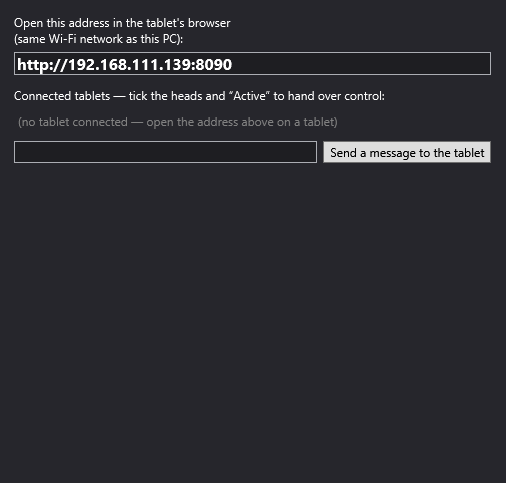
What happens when it opens
The first time the window is opened, DreamShow starts a small web server on port 8090 of the PC. The log says “Server started: http://<PC address>:8090”. The server then stays running until DreamShow is closed, even if you close the window.
The Follow spot (tablets) window
The address to open
“Open this address in the tablet's browser (same Wi-Fi network as this PC):” followed by the address, in bold, for example http://192.168.1.20:8090. The text can be selected and copied.
DreamShow shows the first network address (IPv4) of the PC. If the PC has several network cards, it may not be the one on the tablets' network: in that case use the PC's address on that network, with :8090.
The connected tablets
“Connected tablets — tick the heads and “Active” to hand over control:”
Each tablet appears in a frame, identified by its IP address. If none has connected: “(no tablet connected — open the address above on a tablet)”.
In each frame:
- The state of the tablet, in colour:
- ● green “IN CONTROL”: the tablet is active and has moving heads; “· pilotage en cours” (“driving in progress”) is added when it has sent an aim in the last two seconds;
- ● orange “active — no head assigned”;
- ● grey “connected (inactive)”;
- ○ dark grey “disconnected”: the tablet has lost the link, but its settings are kept.
- Active: hands control to this tablet. On activation, DreamShow reads where the first ticked moving head is already pointing and places the tablet's point there: the moving head does not jump. Unticking gives the moving heads back to the show.
- One box per moving head of the venue: the moving heads this tablet drives. Only the moving heads whose DMX mode really has pan/tilt channels are offered. “(not cal.)” flags a moving head with no calibration: it aims by calculation, from its position declared in the venue. If the venue has no steerable moving head: “(no moving head in this venue)”.
- Last aim: “last aim: u=… v=… · intensity … %”, that is the last position of the finger on the plan (from 0 to 1 in width and in depth) and the intensity. For a disconnected tablet, “(link closed — assignment kept for reconnection)” is added.
A tablet is recognised by its IP address: if it reconnects (standby, Wi-Fi dropped), it gets back its moving heads and its active state.
Sending a message to the tablets
At the bottom: a text area and the Send a message to the tablet button. The text is displayed at the top of the screen of all the connected tablets (“get ready for the king's entrance”, “follow spot on the singer”…). Send an empty message to clear it.
The tablet screen
The tablet page itself is displayed in French (its labels are quoted below with their translation).
- The plan: the venue seen from above, unfolded: the floor in the centre, the stage drawn on it (“scène”, the stage), and the four walls folded out all around, as in DreamShow's plan (“mur du fond”, the back wall, at the top, “mur avant”, the front wall, at the bottom, “jardin”, stage right, on the left, “cour”, stage left, on the right). The plan keeps the proportions of the venue.
- The yellow dot: where the moving heads are aiming. Put your finger down and drag it: the moving heads follow. Dragging onto a strip of wall makes the beam climb up that wall.
- Int. (intensity): vertical slider for the intensity of the driven moving heads (100 % at the start).
- Zoom: vertical zoom slider, from the tightest (bottom) to the widest (top); no effect on a moving head without a zoom channel.
- The status line at the bottom left: “connecté” (connected), “déconnecté — reconnexion…” (disconnected — reconnecting…; the tablet reconnects by itself every second), the position of the finger, or “position lyre : …” (moving head position: …) when the control PC has reset the dot.
How the moving heads are driven
- On the stage and on the floor, a calibrated moving head uses its calibration (the most accurate); elsewhere, or without calibration, DreamShow calculates the aim from the position, orientation and hanging direction of the moving head declared in the venue.
- For a horizontal sweep, DreamShow always starts from the moving head's current position: it does not make a needless full turn.
- The moving heads driven by an active tablet override the show: pan, tilt, intensity and zoom come from the tablet, whatever scene is playing. When you untick Active or the moving head, it goes back to the cue list.
- Several tablets can be active at the same time, each with its own moving heads. Avoid giving the same moving head to two active tablets.
Step by step
- Preferably calibrate the follow-spot moving heads (see Moving-head calibration) and check their position in Venue > Fixtures, addresses, positions….
- Open Venue > Follow spot (tablets)….
- On the tablet, connected to the same Wi-Fi, open the browser and type the address shown. The tablet's status line says “connecté”; in DreamShow, a frame appears with its IP address.
- In this frame, tick the follow-spot moving head(s).
- At the right moment, tick Active: the state changes to “IN CONTROL”.
- On the tablet, put your finger on the actor (on the plan) and follow them. Adjust Int. and Zoom.
- At the end, untick Active: the moving heads go back to the cue list.
Good to know
- The BLACKOUT does not cut the follow spot: the moving heads of an active tablet override everything, general blackout included. To turn them off, lower Int. on the tablet or untick Active.
- Closing the window does not give control back: the server and the active tablets carry on. Untick Active before closing.
- The connection has no password: reserve it for a trusted network.
- When the server first starts, the Windows firewall may ask you to allow DreamShow on the network: accept, otherwise the tablets will not be able to connect.
- There is no “Follow spot” timeline block: control is handed over and taken back in this window.