Art-Net, sACN or USB DMX interface: which should you choose?
Art-Net, sACN or USB DMX interface: which should you choose to connect your computer to your lighting fixtures? All three do the same job: carrying DMX from the PC to the DMX cable that runs to the fixtures. What changes is the route (a USB cable or the network) and the number of universes. Here is the essential, along with exactly what DreamShow, lighting, sound and video control software for Windows, can drive.
First, the universe
A DMX universe is one DMX line of 512 channels. Each fixture uses one or more of them, starting at its address: an 8-channel fixture at address 17 uses channels 17 to 24. A small installation fits in one universe; beyond 512 channels you need several.
To see where you stand, open Venue > Fixtures, addresses, positions…: the status line at the bottom sums it up as “N fixtures, N channels, N universes”.
DreamShow's four outputs
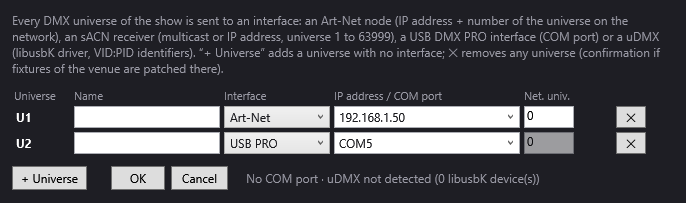
The Venue > DMX connections… window offers one of these interfaces for each universe:
| Interface | Connection | Universes |
|---|---|---|
| USB PRO | USB interface of the Enttec DMX USB PRO type, seen by Windows as a COM port | only one per interface |
| uDMX | small USB-DMX interface (libusbK driver) | only one |
| Art-Net | the network (UDP protocol, port 6454), to an Art-Net node that outputs DMX on its sockets | several on the same node, each with its own network number (0 to 32,767) |
| sACN (E1.31) | the network (port 5568), by multicast or to the IP address of a receiver | several, numbered 1 to 63,999 |
A fifth choice, None, keeps the universe in the venue without sending it anywhere: handy for preparing the patch before you have the equipment.
No other types are offered. Before buying an interface, check that it belongs to one of these families. Details: DMX connections.
How to choose
- A single universe, a small installation, the control position near the stage: a USB interface is the simplest. Plug it in, choose its COM port, and you are ready. A USB interface has only one cable: one universe per interface.
- Several universes, or the control position far from the fixtures: go through the network. An Art-Net node near the stage, a network cable to the control position, and several universes on the same node.
- Art-Net or sACN? Choose whichever your node or receiver understands. sACN is often sent by multicast: if the network does not let it through, enter the receiver's IP address.
Setting up an Art-Net node, step by step
This is the most common case in a venue: the control position at the back of the room, the node at the stage.
- Put the PC and the node on the same network, for example the PC at 192.168.1.10 and the node at 192.168.1.50, mask 255.255.255.0.
- Note the universe number set in the node (often 0 for its first port).
- Open Venue > DMX connections…. On the U1 line: Interface = Art-Net, IP address / COM port = 192.168.1.50, Net. univ. = the number you noted.
- For a second universe on the node's second port: line U2 (or + Universe), same IP address, Net. univ. = 1 if that is the node's setting.
- Click OK. If Windows asks you to allow DreamShow on the network, accept.
Setting up a USB DMX PRO interface
- Plug the interface in before starting DreamShow, and check that its driver is installed (FTDI for Enttec-type interfaces).
- Open Venue > DMX connections…: the bottom line must list its COM port.
- On the U1 line: Interface = USB PRO, IP address / COM port = that COM port.
- Click OK.
The numbering trap
In Fixtures, addresses, positions…, a fixture's Universe field starts at 0. In DMX connections, the universes are called U1, U2… So: a fixture's universe 0 = U1, universe 1 = U2. On the Art-Net side, the first network universe is often 0; in sACN, it starts at 1.
Checking that DMX is going out

- To the right of the Connections… button, a summary lists each output, for example
U1→Art-Net 192.168.1.50/0.FAILEDmeans an interface could not be opened. - DMX > DMX values… shows the 512 channels being sent, live. If the values move, DreamShow is sending: look between the PC and the fixtures.
- DMX > DMX faders… forces a channel by hand so you can test a single fixture.
See DMX values and DMX faders and Troubleshooting.
The other way round: receiving Art-Net or sACN
DreamShow can also listen to the Art-Net or sACN of another program or lighting console and show it in its 3D simulation: DMX > Visualiser mode (Art-Net / sACN in)…. While this mode is on, DreamShow sends nothing. See Visualiser mode.
Good to know
- DMX output is free, on every universe: DreamShow has no universe limit, in Art-Net, sACN or USB.
- The LIVE button must be on in the editor; in show mode, output is always active.
- Connections are saved in the venue: switching venues also switches the outputs.
- A venue whose connections have never been set sends in Art-Net to 127.0.0.1 (the PC itself). Open the window and click OK to fix your settings.
- On the fixture side, the address and the mode (number of channels) must match what is declared in the venue, with a DMX cable in good condition and a terminator at the end of the line.
Frequently asked questions
Can I prepare the patch without having an interface?
Yes. Leave the interface on None: the universe exists, your fixtures are patched on it, and everything can be programmed and checked in the 3D simulation. You will choose the interface when the day comes.
My USB interface does not appear in the list of COM ports. Why?
The list is read when the window opens. Plug the interface in before starting DreamShow, check its driver, then reopen Venue > DMX connections….
Can I put two universes on the same USB interface?
No: a USB interface has only one cable. DreamShow warns you if you try, because the universes would write in turn on the same cable. Use one interface per universe, or switch to Art-Net.
How do I send DMX to another program on the same PC?
In Art-Net, choose the address 127.0.0.1, offered in the list: that is the PC itself.
Try DreamShow on your own show
DreamShow is free, with no feature or time limit: from 3D preparation to show night.