Free DMX software with 3D simulation
Do you want to see a light show before you have the equipment, learn to program moving heads without renting them, or prepare a show at home before the get-in? DreamShow, show control software for lighting, sound and video on Windows, simulates the venue in 2D and 3D with its fixtures, their beams and the video screens. The whole software is free, with no feature or time limit, from preparation in 3D to show night with the real equipment.
What you can do for free
DreamShow is complete and free, with no licence to buy. You can:
- declare your venue and your fixtures, to scale, with their DMX addresses;
- write your scenes on a timeline, with light, sound and video;
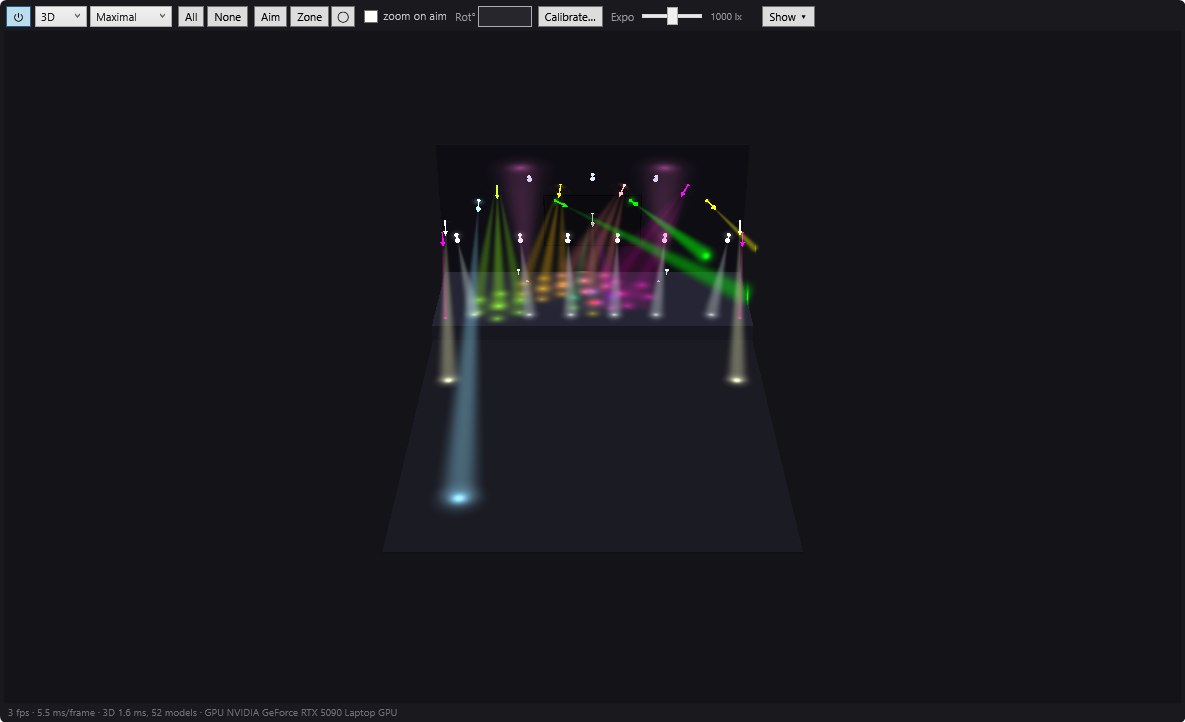
- see the result in 2D (plan seen from above) or in 3D (the venue in volume, beams in the air and their spots on the floor and the walls);
- aim moving heads with a click in the room, or make them cover a zone;
- play the show in Show mode, as on the night of the performance;
- create a show with an AI, use effects, palettes, trajectories, MIDI, OSC or timecode;
- send DMX to real fixtures (Art-Net, sACN, USB interfaces) and drive stage devices (IP video players, follow-spot tablets, robots, LED masks).
3D in practice
The Room panel shows the simulation, at the top centre of the main screen. Choose 3D in its toolbar, then the beam quality:
- Basic: simple cones, the lightest, for a modest PC;
- Standard: a core and a graded halo, soft spots;
- Maximal: volumetric beams drawn by the graphics card. If the card cannot do it, DreamShow falls back to Standard.
Orbit around the room by dragging with the right button, zoom in with the wheel. During playback, moving heads move at a realistic speed, like the real equipment. The panel detaches into a window with ⧉, for example to show it full size on a second screen. See The 2D and 3D simulation.
Real fixtures, not generic shapes
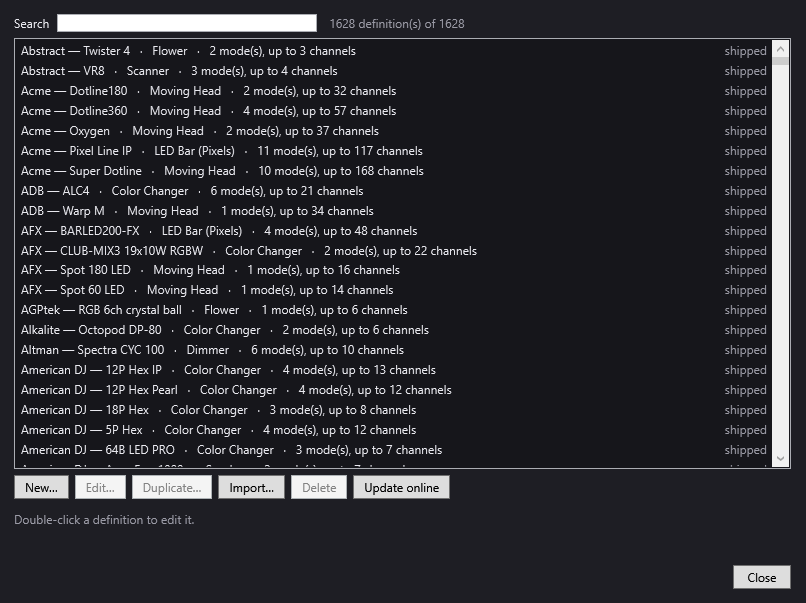
DreamShow comes with more than 1,600 fixture definitions in the QLC+ format: each model with its channels, modes and functions. It also imports GDTF, QLC+ and DJworld profiles, and an editor lets you create the missing ones. When a fixture's luminous flux or photometry is known, the simulation uses it: zoom, distance and angle change the illuminance, and the Expo slider sets the level that looks "well lit". See The fixture library.
Programming moving heads without owning them
In 3D as in 2D, the Aim tool points the selected moving heads at the place you click: the floor, the stage or a wall, height included. The Zone tool draws a zone shared by the moving heads, as a rectangle or an ellipse, that you move and rotate with the mouse. You see at once whether the beam lands in the right place. See Aiming and covering a zone with moving heads and the guide Program DMX moving heads for free.
Seeing another desk's show in 3D
Already playing from a lighting desk or another program? DMX > Visualiser mode (Art-Net / sACN in)… shows the DMX received from the network in the simulation. Declare the same fixtures at the same addresses, and you see its show in 3D. In this mode, DreamShow sends nothing. See Visualiser mode.
Moving to real equipment
When your show is ready, set the DMX output in Venue > DMX connections…: Art-Net, sACN or USB interface (DMX USB Pro and compatibles, uDMX), at no cost and with no universe limit. The show you wrote in simulation stays the same: the addresses declared in the venue are those of your fixtures. See DMX connections, the guide Art-Net, sACN or USB DMX interface, and download DreamShow.
Good to know
- DreamShow runs on Windows 10 and 11 only, not on Mac or Linux.
- The simulation comes close to the real rendering, but does not replace a test on stage.
- If you are looking for free, open-source software that also runs on Mac and Linux, QLC+ is free and offers a 3D preview in its version 5 (checked on 5 October 2026). The comparison details the differences.
Frequently asked questions
Is the 3D simulation really free?
Yes, with no time limit. The venue, the fixtures, the timeline, sound, video and the 2D and 3D simulation are free, and so is the output to real equipment: there is no paid version.
Do I need a DMX interface to try it?
No. Leave the universes on the None interface in Venue > DMX connections…: your fixtures are patched, and everything happens in the simulation. You will choose the interface when you have the equipment.
Is my PC powerful enough for 3D?
Basic quality suits modest PCs. Maximal depends on the graphics card: if it cannot do it, DreamShow switches to Standard by itself. The ⏻ button turns the simulation off to relieve the PC, without stopping the DMX output.
Can I import my own fixtures?
Yes: GDTF (.gdtf), QLC+ (.qxf) and DJworld (.fxt) profiles can be imported into the library, and an editor lets you create a missing definition.
Try DreamShow on your own show
DreamShow is free, with no feature or time limit: from 3D preparation to show night.