Have an AI write a lighting show (ChatGPT, Gemini, Claude)
Can an AI such as ChatGPT, Gemini or Claude write a lighting show? Yes, with DreamShow, and without handing it the keys to the control position. DreamShow prepares a request that describes your venue; you paste it into the AI of your choice with your text or your music; you bring its answer back into DreamShow, which checks it line by line before creating anything. You review the result in 2D and 3D simulation, then play it on the real fixtures: DreamShow is free, with no feature or time limit.
Who does what
- DreamShow describes the venue to the AI (groups of fixtures, role and location, available sounds, permitted vocabulary), then checks its answer and builds the show with your real fixtures.
- You choose the AI, paste the request into your browser, attach your document, copy the answer and review the result.
- The AI proposes a plan. With the first method, it never writes a DMX value or an address: only moods, zones, groups and files.
Two methods, two results
| Create a show with an AI | DMX stream by an AI | |
|---|---|---|
| Menu | File > Create a show with an AI… | File > DMX stream by an AI… |
| Starting point | the text of a play, a cue sheet, a running order | a piece of music |
| The AI returns | a plan of scenes (text to paste) | a .DmxStreaming file, frame by frame |
| Result | scenes you can edit block by block | a scene that replays the stream as it is, with the music |
| AI needed | any conversational AI | an AI chat able to run Python |
Method 1: a complete show from your text
- Check that the right venue is active and that its groups have meaningful names (“Front”, “Backlights”, “Moving heads”): the AI uses them.
- Open File > Create a show with an AI… and type the Show name.
- Add the sounds (lines, music, sound effects) with Add files… or Add a folder…. Their lengths are passed to the AI.
- Click Copy the request.
- In your browser, open a conversation with the AI, paste the request, then attach your text (Word, PDF) or paste it after the request. Send.
- Copy all of the AI's answer, go back to DreamShow and click Paste: the check starts.
- If there are errors in red, copy them back to the AI, asking it to correct them and send the complete answer again, then repeat step 6.
- When the report says “Everything is understood: you can create the show.”, click Create the show ✨.
- Review the show scene by scene and save (Ctrl+S).
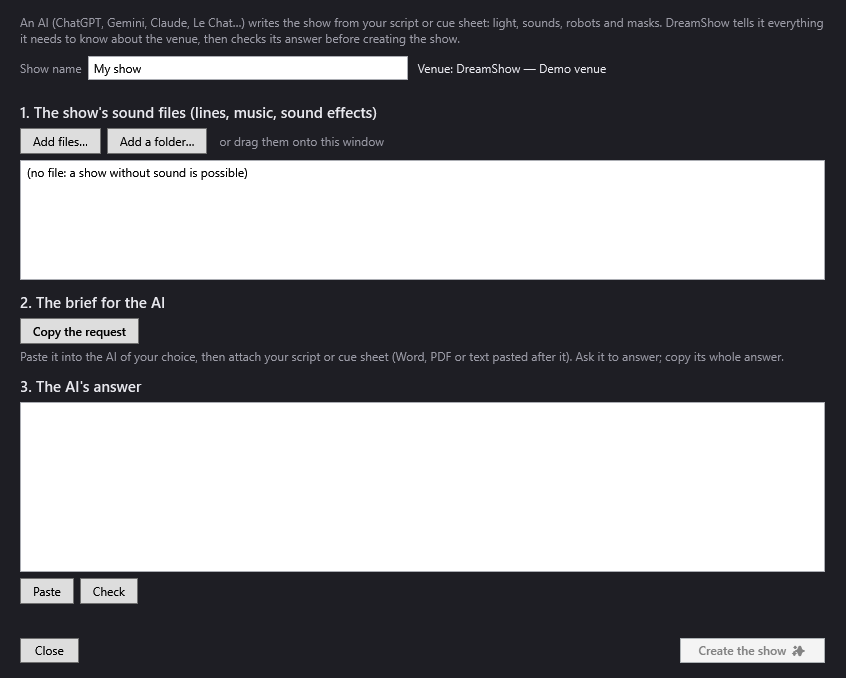
What you get: one scene per moment, with its lighting (day, evening, night, mystery mood…, on the whole stage or a zone), its trigger (Go, automatic or chained), its fade and the note for the operator. The sounds are placed on the timeline. The AI can also ask for six simple effects (rainbow, chase, pulse, wave, and circle and figure eight for the moving heads), created as dynamic effects that you can edit. The moving heads really do aim at the requested zone. See Creating a show with an AI.
Would you rather start from a piece of music without going through an AI? The first-show wizard does it directly: see the guide A lighting show set to a piece of music.
Method 2: a DMX stream locked to a piece of music
Here, the AI writes all the lighting of a piece of music, frame by frame.
- Save the show at least once (Ctrl+S): the stream and the music will go into its media folder.
- Open File > DMX stream by an AI… and choose the music. DreamShow analyses it: length, tempo, beats, bars, sections, accents.
- Tick the fixtures concerned (the group buttons are quick). Untick the smoke machine or the house lighting.
- Write your intentions if you have any (“cold blue at the start, an explosion of colour on the chorus”).
- Click Copy the request, or Save the request… if the chat refuses such a long message.
- In an AI chat able to run Python, paste the request (or attach the file). The request asks it to write and run a script with the supplied Python module, then give you the file.
- Download the
.DmxStreamingfile, then click Import the stream… and read the report. - Click Add a scene with this stream, close the window and start playback.
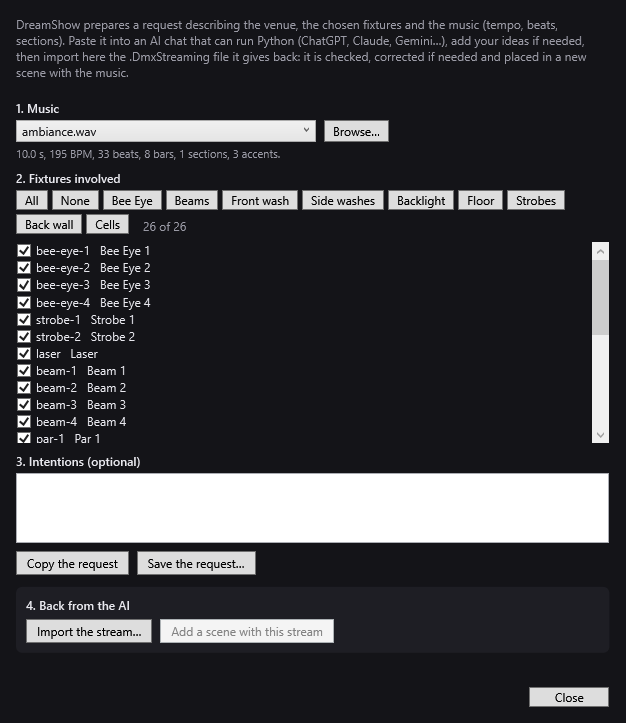
If the chat cannot run code, it gives you a script: run it on your PC with Python 3. See DMX stream by an AI.
The safeguards
- Method 1: nothing is created while an error remains (missing file, unknown group…). Strobes are never triggered from an AI answer, even if it asks for them. Special devices (smoke, fans, UV) are never switched on by a mood; if the AI turns them on, a warning asks you to check.
- Method 2: DreamShow corrects a copy of the file. It removes the channels that do not belong to the ticked fixtures, resets to neutral any value written on a locked channel (reset, lamp, automatic programs…) or in a forbidden range, and slows down movements that are too fast for a real moving head (about 180° per second). It also flags a strobe that is too long, too present or flashing too fast.
Good to know
- The result depends on the AI and on the precision of your text. The more it says “night is falling” or “a spotlight on the king, stage left”, the more accurate the show.
- Method 1 gives a simple starting point: one mood per scene. Moving-head movements, trajectories and videos are added afterwards in the timeline. See The scene timeline.
- The request describes the venue at the moment you copy it. If you change the groups, copy it again.
- A stream is tied to the DMX addresses of the moment: if you re-patch, redo the request and the stream. It replays as it is: you do not touch it up block by block like a scene.
- These functions are free in DreamShow, and so is sending the result to the real fixtures. The AI you use is chosen by you, under its own conditions.
Frequently asked questions
Which AI should I use?
For method 1, the conversational AI of your choice: ChatGPT, Gemini, Claude, Le Chat… For method 2, you need a chat able to run Python; otherwise, it gives you a script to run yourself.
Can the AI misconfigure or damage my fixtures?
With method 1, it writes no DMX value: DreamShow builds everything. With method 2, DreamShow resets forbidden values to neutral, removes foreign channels and limits the moving heads' speed before importing anything.
DreamShow reports errors: what should I do?
Copy the red lines of the report, paste them back into the conversation and ask the AI to correct them and send its complete answer again. If it is a forgotten sound file, add it in the window, then click Check.
Do I have to pay DreamShow for this?
No. DreamShow is free, with no feature or time limit: creating, checking and viewing the show in 3D, then playing it on the real equipment, cost nothing. Only the AI you choose has its own conditions.
Try DreamShow on your own show
DreamShow is free, with no feature or time limit: from 3D preparation to show night.