Lighting software for schools, conservatoires and student shows
Are you looking for lighting software to teach stage lighting in a school, a music, dance or drama conservatoire, or to prepare the students' show? DreamShow is lighting, sound and video control software for Windows. It is free, with no feature or time limit, from preparation to show night: each student can install it, learn and prepare their work in 2D/3D simulation without fixtures, and the venue's PC drives the real equipment at no cost.
Situations in a school or college
- An introductory course in show control: understanding a fade, a lighting plot, a cue list, without monopolising the theatre.
- The drama class staging its end-of-year play, the music class preparing its concert, the dance workshop and its show.
- Students preparing the lighting at home, then bringing it to the venue's PC.
- A venue already fitted with a lighting console, which you would like to see in 3D.
1. Learning without fixtures
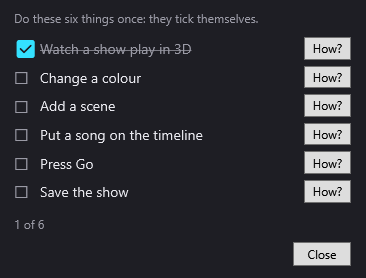
On first launch, the Welcome to DreamShow screen offers to watch the 3D demonstration, create a first show or declare fixtures. The first steps checklist then gives six things to do once (watch a show in 3D, change a colour, add a scene, add music, press Go, save): they tick themselves off, and a How? button shows where to click. See First steps.
The installation also provides examples to take apart: the demonstration venue and show, a large venue of 120 fixtures with its show, and a show written by an AI. The complete manual opens in the software (F1 key on the current window) and exists as a PDF, to print for the class (menu ? > User manual (PDF)…).
2. Understanding in 3D
The simulation shows the venue in 2D or 3D, with the beams in the air and their pools of light on the stage, locked to the timeline's red line. Students see what a fade does, a backlight, a moving head that changes position; they can point the moving heads with a click using Aim, or make them cover a zone. See 2D and 3D simulation and the guide Prepare your show in 3D.
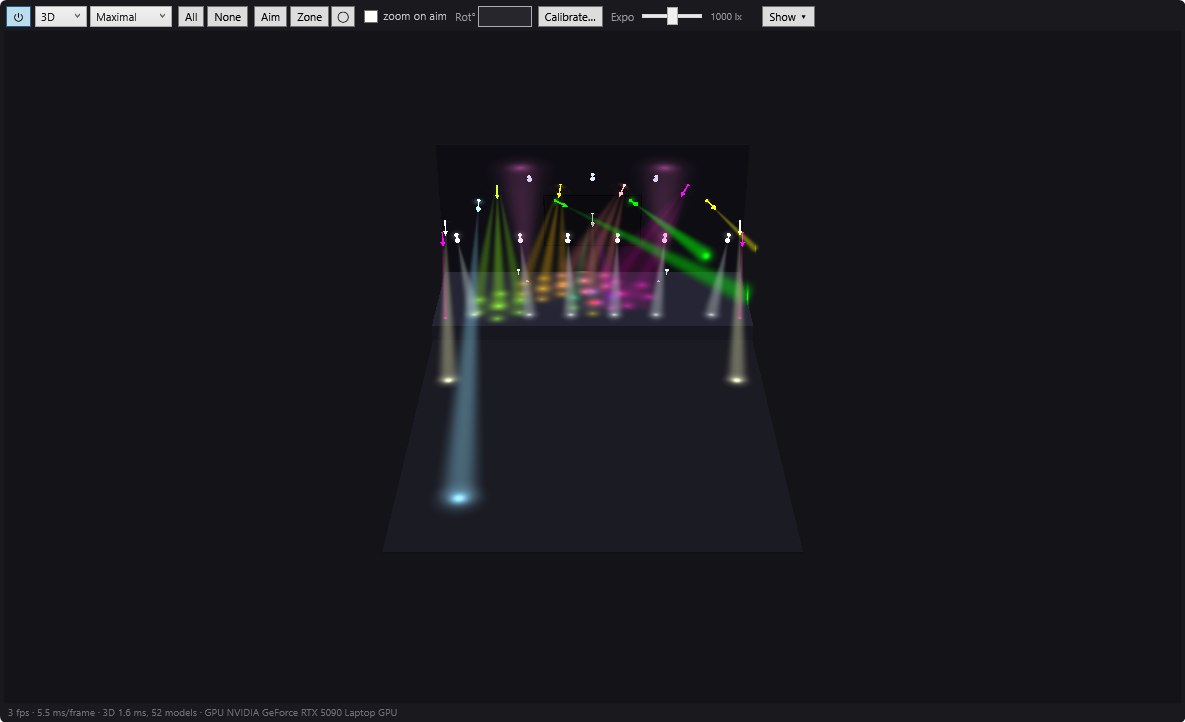
On a modest PC, Basic quality or the 2D view stay smooth; a recent graphics card improves the 3D noticeably.
3. Preparing the end-of-year show
The Create my first show wizard starts with the type of performance:
- A theatre play: a typical cue sheet (audience entry, house blackout, day, evening, night, bows…) that students adapt, with, for each moment, a mood, an area of the stage, a fade, a note for the stage manager and a sound.
- A musical show: the songs are analysed (tempo, beats, verses and choruses) and DreamShow writes one scene per song.
The result is then touched up in the timeline: a very good starting point for explaining how a cue list is built. On the day of the show, Show mode opens a cue window readable from a distance, with GO, ◀ Previous and BLACKOUT. See Creating your first show.
4. Does your venue already have a lighting console?
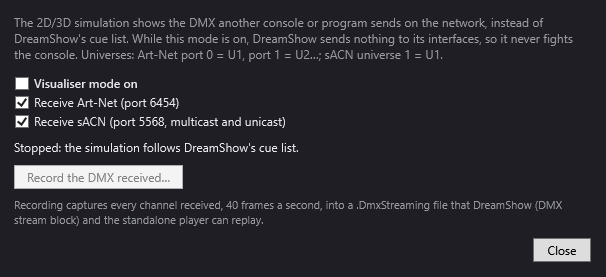
Visualiser mode (menu DMX > Visualiser mode (Art-Net / sACN in)…) turns DreamShow into a monitoring screen: the 3D simulation shows the DMX that a lighting console or another program sends over the network, in Art-Net or sACN. While this mode is on, DreamShow sends nothing. Students program on the school's console and see the result in 3D, even without being in the venue. See Visualiser mode.
5. Six languages
The interface exists in French, English, German, Spanish, Italian and Chinese. The language menu is a globe, so that everyone can find it even in front of an interface they cannot read. Handy for an international class or an exchange.
6. On the school's computers
- No administrator rights: DreamShow installs in the Windows user's profile. If a Microsoft Visual C++ component is missing, Windows may nonetheless ask for permission during installation.
- No Internet needed to work.
- A project travels in one file: File > Export the whole project (zip)… gathers the venue, shows, effects and media; Import a project (zip)… reopens it on another PC. See Installation, languages and updates.
Good to know
- DreamShow runs on Windows 10 and 11 (64-bit) only: no Mac or Linux.
- DreamShow is free on every computer, with no feature or time limit. To send DMX to real fixtures, you only need a DMX interface (USB or network).
- The simulation approaches the real rendering, but does not replace a session on stage.
- The timeline has no undo (Ctrl+Z): teach students to save often.
Frequently asked questions
Can students install DreamShow at home?
Yes, on a Windows 10 or 11 PC. DreamShow is free, with no feature or time limit, and the whole show can be prepared at home in 2D/3D simulation.
How does a student hand in their work?
With File > Export the whole project (zip)…: a single file contains the venue, shows, effects and media. On the venue's PC, File > Import a project (zip)… reopens it. Careful: the import replaces files that have the same name (venue, shows, effects, media). Ask each student to give their show a name that is clearly their own.
Can we install it on every computer in the school?
Yes, free of charge: there is no licence to buy, for the classroom computers or for the PC that drives the fixtures.
Can I work without an Internet connection?
Yes. The Internet is only used to look for updates and to update the fixture library online.
Try DreamShow on your own show
DreamShow is free, with no feature or time limit: from 3D preparation to show night.