Show control software for live performance: lighting, sound and video in one cue list
Show control software is the tool that runs the technical side during a performance: the lights that change, the music that starts, the video that appears, at the right moment. DreamShow is lighting, sound and video control software for Windows. Your whole show fits in a single cue list: you press GO, and the lighting, sound and video of the scene start together. Everything can be prepared and rehearsed in 2D and 3D simulation, and the software is free from preparation to show night.
Show control or show management?
The two terms often get mixed up in searches. Show management software handles the administration: ticketing, schedules, contracts, tours. Show control software handles what happens on stage during the performance. DreamShow is show control software: it does not sell tickets or manage schedules.
One timeline for lighting, sound and video
In DreamShow, a show is a sequence of scenes, one per moment of your cue sheet. Each scene has its lighting, its fade, a message for the operator and, if needed, a timeline that holds:
- lighting blocks and effects (chases, moving-head sweeps, trajectories);
- sounds: walk-in music, sound effects, with the Sound level, Stop sound and Silence blocks to bring music down under a line or cut it;
- videos and pictures, sent to a screen by its name;
- waits, to hold the scene until something happens.
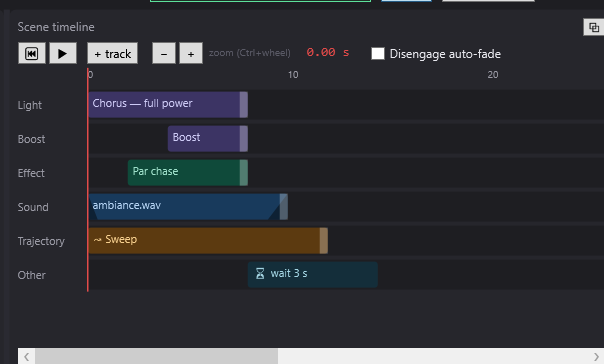
Everything starts when the red line reaches the block, with its fades. There are no three programs to keep in sync: the music and the lighting sit on the same time line. See The timeline and Sound and video on the timeline.
Running the performance on GO
The Show mode button opens the cue window, made to be read from a distance: the current scene, its progress, the next scene, your message in yellow, and three big buttons GO, ◀ Previous and BLACKOUT. It can go onto a second screen (F11 for full screen) or shrink to a strip (F9).
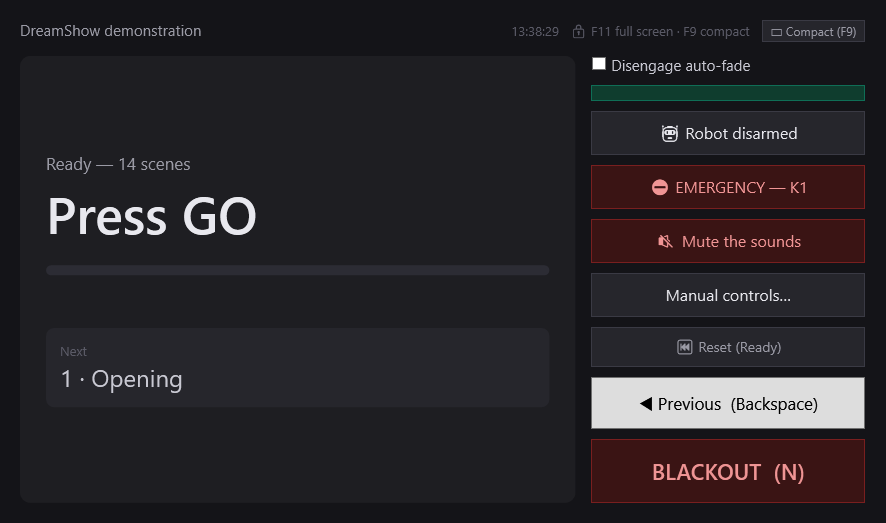
GO stays greyed out while the current scene has not finished its timeline: no accidental double GO. The space bar or a presentation remote can act as GO. See Show mode and the cue window.
When the show control follows the actors
Some cue sheets are not triggered by hand. The Wait for a spoken line… block holds the timeline until an actor has said a given line into the microphone. DreamShow recognises the voice itself, in French, English, German, Spanish or Italian, without Internet, then the scene goes on. A line said approximately also passes. A Fallback key phrase and a Fallback delay avoid getting stuck if the line goes wrong. See Wait for a spoken line.
For the actors, the Teleprompter shows the play's text on a backstage screen, a tablet or an LED panel. It moves on from a phone, a key, or by voice. See The teleprompter.
Video and backstage screens
A screen can be a monitor or a projector connected to the PC, or an IP video player on the network. Each screen has a name, and the video blocks of the timeline target that name. Placed in the venue, the screen also shows in the 3D simulation. See Video screens.
Backstage displays show, in dressing rooms or in the wings, the messages sent by the timeline: "Curtain up in 5 minutes", the current scene. See Backstage displays.
Rehearsing before you have the stage
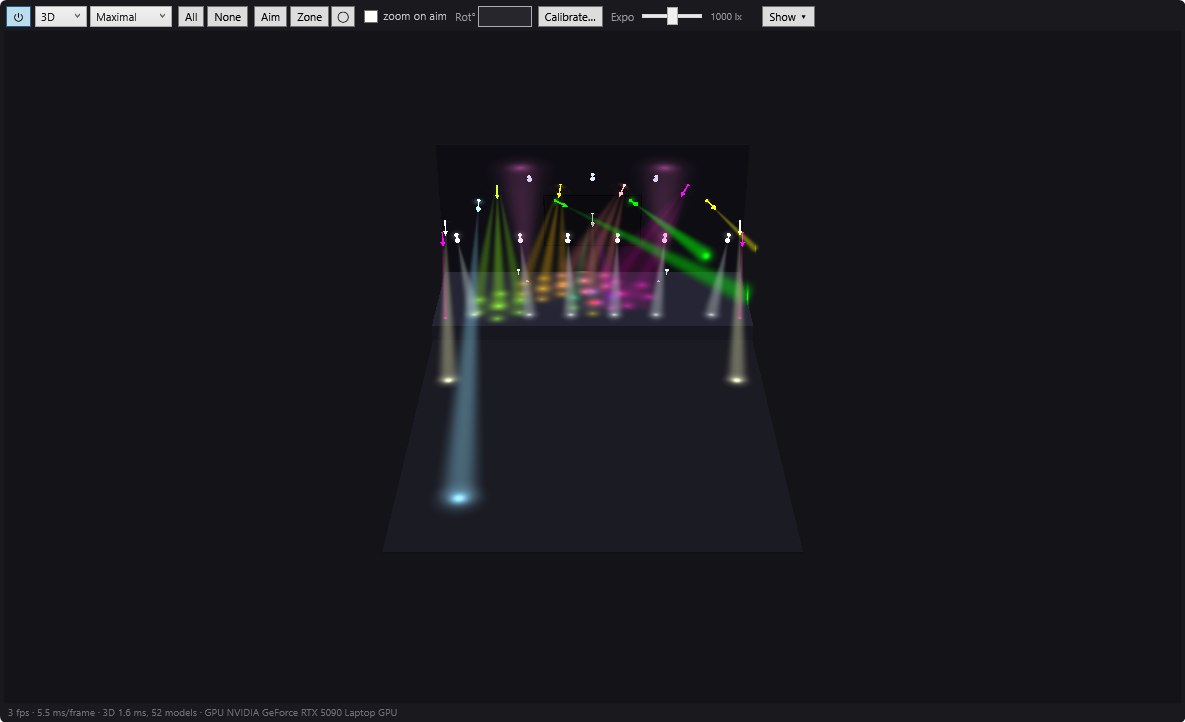
The Venue panel shows your venue in 2D or 3D, with the beams and their spots on stage. You run the whole cue list at home, without a single fixture connected. The simulation comes close to the real rendering, but does not replace a test on stage. See The 2D and 3D simulation and the guide Free DMX software with 3D simulation.
For which show?
- Theatre: a cue list on GO, day and night moods, sounds on a line. See Theatre lighting software.
- Cabaret and musicals: lighting locked to the music. See Show control for cabaret and musicals.
- Village hall, association: simple show control for volunteers. See Show control for a village hall.
- School, music school: see Show control for a school or music school.
DreamShow is developed by Polux (Le Paradise, Alès, France) and is used in its own venues.
Good to know
- DreamShow runs on Windows 10 and 11 (64-bit) only: there is no Mac or Linux version.
- DreamShow is free, with no feature or time limit: output to real equipment (DMX, IP video players, follow-spot tablets, backstage displays) is included. No licence, no purchase, no subscription.
- Between the PC and the fixtures you need a DMX interface: USB, or an Art-Net / sACN node. See Art-Net or USB DMX?.
- Other show control programs exist, free or paid, on Windows, Mac or Linux. The comparison puts DreamShow side by side with eight of them, with their prices collected on 5 October 2026, and also says what DreamShow does not do.
Frequently asked questions
Do I need one program for lighting and another for sound?
No. In DreamShow, sounds and videos sit on the same timeline as the lighting. A single GO starts everything the scene holds.
Can I prepare my show without any equipment?
Yes. DreamShow runs in 2D and 3D simulation without any fixture connected. You declare your venue and fixtures, write the cue list and rehearse it on screen. On show night, the same software drives the real equipment, at no cost.
Can the show control follow the actors' text?
Yes, with the Wait for a spoken line… block: DreamShow listens to the microphone during that block only, recognises the line (French, English, German, Spanish or Italian, without Internet), and the scene goes on. A fallback key phrase and a fallback delay avoid getting stuck.
Does DreamShow run on a Mac?
No, only on Windows 10 and 11. If you are looking for software that also runs on Mac and Linux, the comparison presents some.
Try DreamShow on your own show
DreamShow is free, with no feature or time limit: from 3D preparation to show night.